





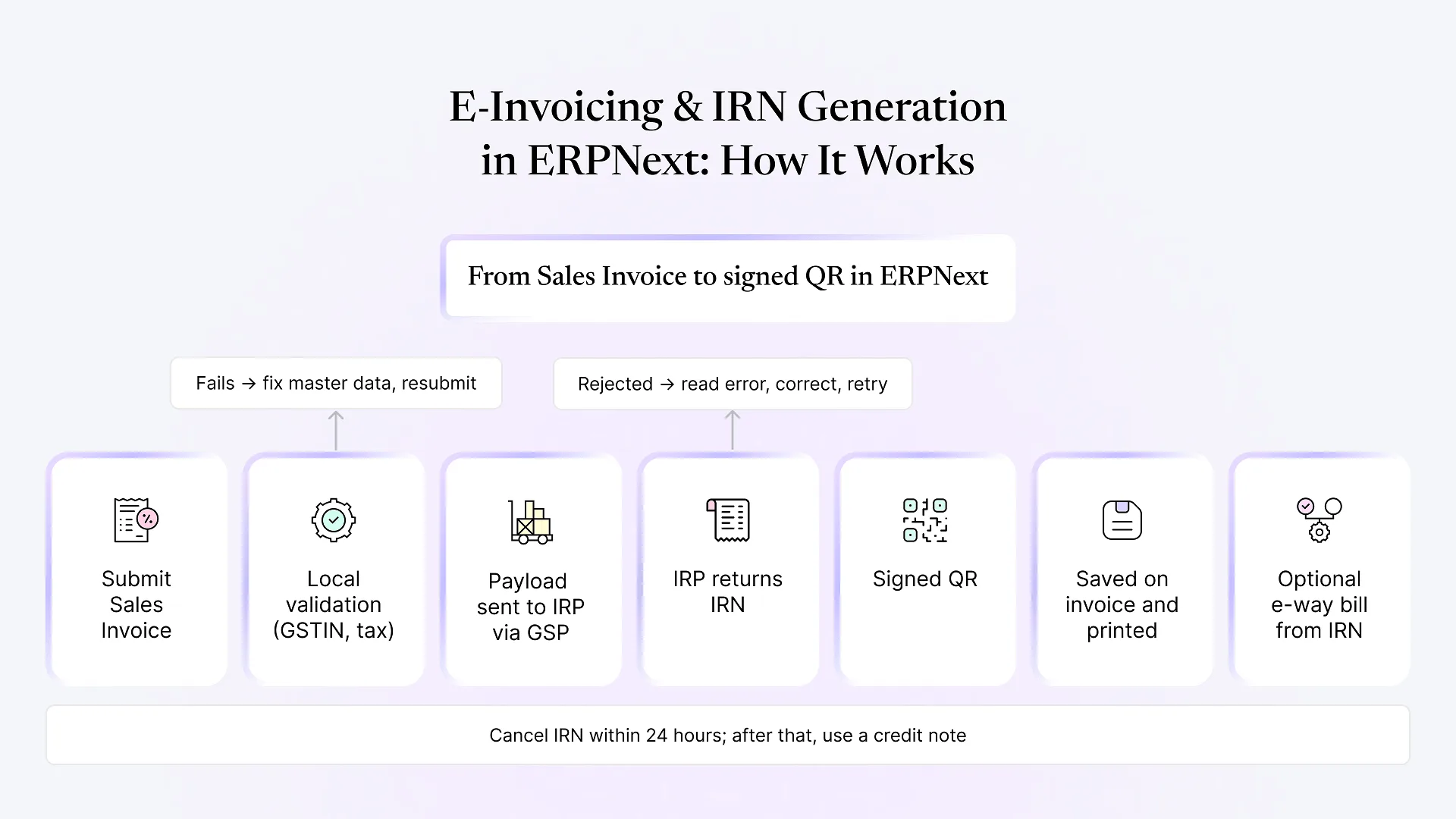
e-Invoicing IRN generation in ERPNext means a submitted Sales Invoice is sent automatically to the government’s Invoice Registration Portal (IRP) through the India Compliance app. The IRP validates it and returns a unique Invoice Reference Number (IRN) and a digitally signed QR code. ERPNext saves both to the invoice and prints them. Nobody has to upload anything to the portal by hand.
That’s the short answer. Getting it to work reliably usually takes more effort than the settings screen suggests. Most problems we see after go-live come from master data, not the integration. This guide covers how the flow works, what to set up, what the IRP rejects, and the decisions your finance team should settle before the first live invoice.
Who needs e-invoicing and why the timing matters
At the time of writing, GST e-invoicing applies to businesses whose aggregate annual turnover (AATO) has crossed ₹5 crore in any financial year since 2017-18. It covers B2B invoices, exports, SEZ supplies, and the related credit and debit notes. B2C invoices are generally out of scope.
Businesses with an AATO of ₹10 crore or more face an extra constraint: an invoice must be reported to the IRP within 30 days of its date, or the portal won’t issue an IRN for it. This is why ERPNext e-invoice setup can’t be pushed to “after month-end.” An invoice that misses the window can’t be backfilled.
Thresholds and time limits change through GST notifications. Confirm current applicability with your CA before you configure anything.
How e-invoicing IRN generation works in ERPNext
Sales Invoice is submitted
ERPNext checks whether the company, customer and transaction are eligible for e-invoicing.
Validation runs locally first
The app checks GSTINs, HSN/SAC codes, place of supply, tax amounts and address fields before anything is sent.
The JSON payload goes to the IRP
through a GST Suvidha Provider (GSP) using your API credentials.
The IRP returns an IRN and signed QR code
The IRN is a 64-character hash unique to that supplier, document type, document number and financial year.
ERPNext stores the response on the invoice
The QR code appears on the print format, and the invoice is locked against edits that would change what was reported.
Optional e-way bill
If goods are moving, an e-way bill can be generated from the same invoice using the IRN, without re-entering transport details elsewhere.
Setup checklist before your first live invoice
Install and configure India Compliance on a supported ERPNext version, and enter GSTIN-wise API credentials in GST Settings.
Turn on e-invoicing per company and set the applicability date so older invoices aren't picked up by mistake.
Clean customer masters. Each B2B customer needs a valid GSTIN, a billing address with the correct state and PIN code, and the right GST category (registered, SEZ, overseas and so on).
Clean item masters. Every sellable item needs a valid HSN/SAC code and the right tax template.
Check your own addresses. Company and dispatch addresses must match what's registered on the GST portal.
Test in sandbox first. Run normal invoices, credit notes, export and SEZ cases, and a deliberately broken invoice to see how errors show up.
Decide who owns failures. Someone in accounts needs to watch for invoices stuck without an IRN every day, not at month-end.
If your ERPNext setup has grown through several hands and master data is uneven, the cleanup usually needs a structured pass. That’s part of how we approach tailored ERPNext implementation for compliance-heavy businesses.
If you’re unsure whether your current masters will pass IRP validation, that’s a quick thing to review on a call.
Common IRP rejections and what they usually mean
| What you see | Likely cause | Where to fix it |
|---|---|---|
| Invalid GSTIN for buyer | Typo, cancelled GSTIN, or wrong GST category on customer | Customer master |
| Invalid HSN code | Missing, outdated or non-existent HSN on item | Item master |
| State / PIN code mismatch | Address state doesn't match PIN or GSTIN state code | Customer or company address |
| Duplicate IRN | Same invoice number already reported for that year | Naming series, or invoice was already registered |
| Tax value mismatch | Rounding or item-level tax template inconsistent with totals | Tax template and rounding settings |
| Invoice older than 30 days | Reported too late (AATO ₹10 crore and above) | Can't be fixed on the IRP. Talk to your CA. |
Cancelling vs. issuing a credit note
An IRN can be cancelled only within 24 hours of generation, and only in full. The IRP doesn’t allow edits. After 24 hours, a correction means issuing a credit note (which gets its own IRN) and, if needed, a fresh invoice.
In ERPNext, cancelling the IRN and cancelling the Sales Invoice are linked but separate steps. Your team should know which one they’re doing. Agree on an internal rule early, for example: “price or quantity errors after 24 hours always go through a credit note.” This prevents ad hoc fixes that confuse GSTR-1 reconciliation later.
Where specialist help makes a difference
Most ERPNext e-invoice guides stop at the settings screen. In practice, effort goes into three areas: cleaning legacy masters, handling edge cases like SEZ, export and multi-GSTIN companies, and building a daily routine for failed submissions.
Aavatto has worked hands-on with Frappe and ERPNext since 2020, delivering in India and the Middle East. We often take over ERPNext setups another vendor started. In those cases, half-finished compliance configuration is a common reason the client calls us. We’d rather tell you up front which parts are simple and which need care.
Frequently Asked Questions
Getting it right the first time
E-invoicing in ERPNext is reliable once the groundwork is done. The risk sits in master data, edge cases and missed deadlines, not the software.
If you’re about to turn on e-invoicing, or it’s already live and causing rejections, book a free ERPNext consultation. We’ll review your GST settings, a sample of customer and item masters, and your current failure log, then tell you plainly what needs fixing before it becomes a filing problem.