





e-way bill generation in ERPNext runs through the India Compliance app, which connects ERPNext to the government e-way bill system over an API. Once GST details, addresses and transporter data are set up correctly, your team generates, updates, cancels and prints e-way bills from the Sales Invoice or Delivery Note itself, with no re-entry on the portal.
That is the short answer. The longer one is that the feature is rarely the problem. The data feeding it is. This guide covers how the workflow runs, what has to be configured first, and where e-way bills tend to fail once a dispatch team starts using them daily.
How e-way bill generation in ERPNext works
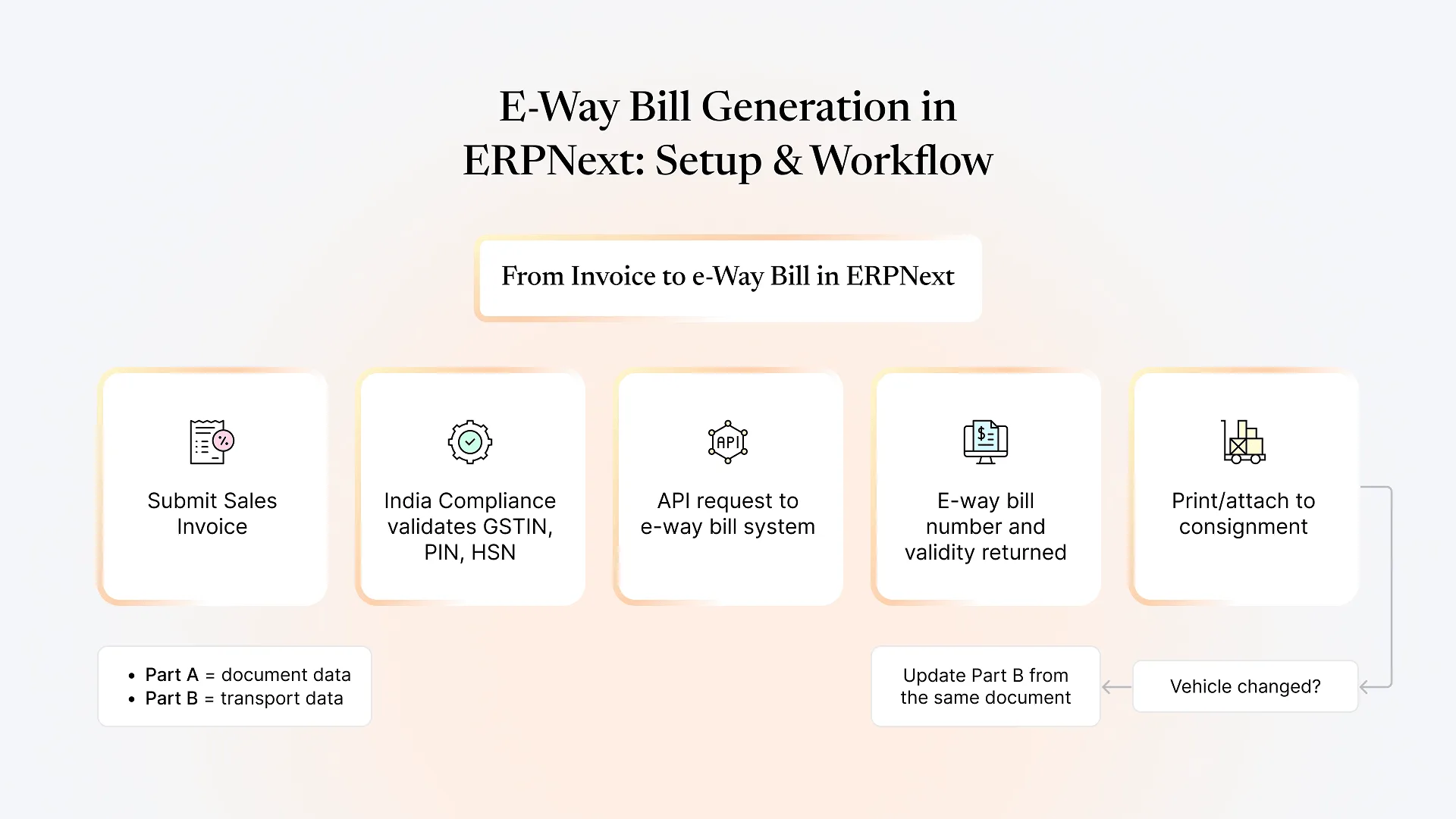
An e-way bill has two parts. Part A carries the document details: supplier and recipient GSTINs, place of dispatch and delivery (with PIN codes), invoice number and date, HSN codes, taxable value and tax. Part B carries the transport details: vehicle number, or the transporter’s ID and transport document.
In ERPNext, nearly all of Part A already exists on a submitted Sales Invoice. The India Compliance app reads it, validates it against what the portal expects, and sends it through the API. The portal returns an e-way bill number and validity date, which are stored against the document.
If you also generate e-invoices, the e-way bill can be created alongside the IRN, since the e-invoice already carries the Part A data. Teams that issue both from one screen avoid the mismatch of an e-invoice saying one thing and an e-way bill saying another.
Setup checklist before your first e-way bill
India Compliance app installed and API access active
Generation happens through the app's API connection, not by scraping the portal. Credentials and API access need to be configured in the app's settings.
Company GSTIN and addresses complete
Each dispatch location needs its own address with the correct GSTIN, state and PIN code.
Customer addresses with valid PIN codes
The portal checks PIN code against state. A Gujarat GSTIN with a Maharashtra PIN code will be rejected.
HSN codes on every item
Missing or incorrectly formatted HSN codes are a common blocker, especially on items migrated from older systems.
Transporters set up as suppliers
with their GST Transporter ID, so Part B can be filled by selecting the transporter instead of typing an ID.
Distance handling agreed
The portal calculates PIN-to-PIN distance and allows a limited tolerance. Decide whether users enter distance or let the portal compute it.
Roles and permissions
Decide who can generate, who can cancel, and who can update vehicle details. Cancellation rights in particular should not sit with every user.
If you are setting this up as part of a wider rollout, it belongs inside the GST configuration phase of a tailored ERPNext implementation rather than as a bolt-on after go-live.
If half of this list is already uncertain in your current setup, a short review usually surfaces it faster than a week of rejected requests.
The day-to-day workflow
Submit the Sales Invoice (or Delivery Note, where goods move before invoicing).
Fill in transporter, vehicle number and mode of transport on the document, or choose to add Part B later.
Generate the e-way bill from the document's actions menu.
Print the e-way bill and send it with the consignment.
If the vehicle changes in transit, update Part B from the same document. No new e-way bill is needed.
If the shipment is called off, cancel within 24 hours of generation. After that, the portal does not allow cancellation and the record stays.
Non-sale movements: where setups often fall short
E-way bills are not only for sales. Goods sent for job work, stock transferred between branches, and returns to suppliers can all need one when the value crosses the threshold.
This is where many ERPNext setups have gaps. The sales flow gets configured carefully, while branch transfers and job work challans are left to the portal. Depending on your India Compliance app version, e-way bills can be generated from documents beyond the Sales Invoice, such as Delivery Notes and some purchase and stock documents. Check which document types your version supports before assuming manual entry is the only route.
For manufacturers sending material out for dyeing, machining or packing, this is often the single biggest source of manual e-way bill work left after go-live.
Common reasons e-way bill requests fail
| Failure | What usually causes it | Fix inside ERPNext |
|---|---|---|
| Invalid PIN code for state | Address migrated with wrong or missing PIN | Correct address master; add validation on new addresses |
| GSTIN mismatch | Customer GSTIN not updated after a change | Refresh party GSTIN; validate before submit |
| HSN code rejected | Item imported with incomplete HSN | Clean item master in bulk |
| Distance out of tolerance | Manually entered distance far from PIN-to-PIN distance | Leave distance blank or enter realistic values |
| Cannot cancel | More than 24 hours since generation | Agree a same-day cancellation process |
| Document too old | Invoice dated more than 180 days ago | Plan dispatch against current documents |
ERPNext vs standalone e-way bill software
Standalone e-way bill software and GSP portals work, but they sit outside your ERP. Someone exports invoice data, uploads it, and copies the e-way bill number back. Each handoff is a chance for a mismatch.
Generating from ERPNext keeps the e-way bill tied to the document it came from. Audit trails, reports and reconciliation all start from one record. The tradeoff is that ERPNext’s master data has to be clean, because the portal will reject what your ERP sends just as quickly as what a person types.
Frequently Asked Questions
Get your e-way bill setup reviewed
If your team is still re-keying invoices into the portal, or rejected e-way bills are holding trucks at the gate, the fix is usually in configuration and master data rather than in new software. Aavatto has worked on ERPNext for Indian manufacturers and distributors since 2020, and GST, e-invoicing and e-way bill setup is a routine part of that work.
Book a free ERPNext consultation and we will walk through your current e-way bill flow, including the non-sale movements that are easy to miss.