





How do you configure TDS and TCS in ERPNext?
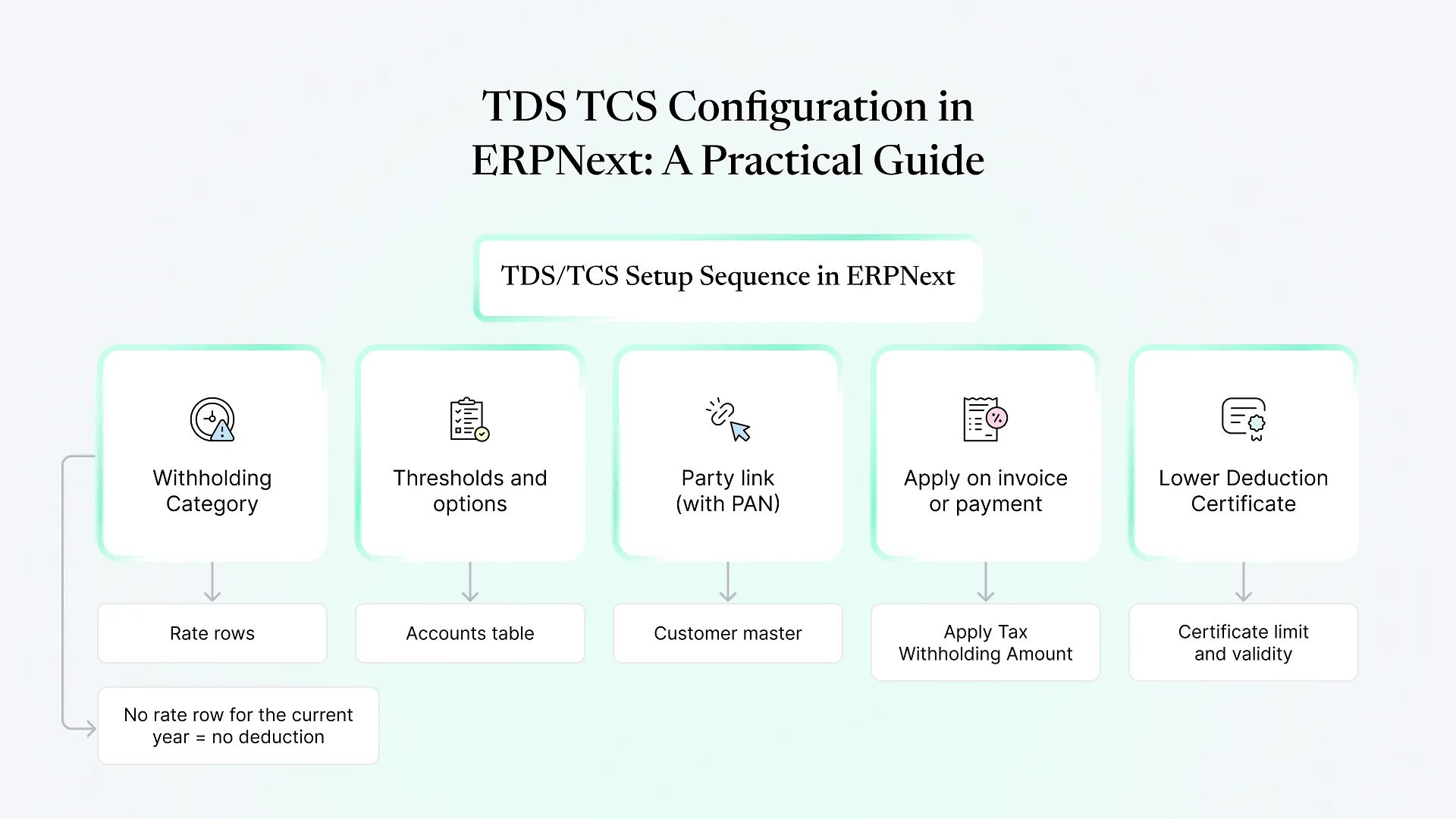
TDS TCS configuration in ERPNext comes down to four pieces: a Tax Withholding Category for each section (with rates and thresholds per financial year), a company-wise payable or receivable account on that category, the category linked to each Supplier or Customer, and the "Apply Tax Withholding Amount" option on the invoice or payment.
That is the mechanism. The harder part is getting the details right, because ERPNext calculates exactly what you configure. A wrong threshold or a missing fiscal-year row will not throw an error. It will quietly deduct the wrong amount, and you find out at quarterly return time.
This guide walks through the setup sequence, the settings that cause most mismatches, and what changed for Indian businesses in 2025 and 2026.
TDS TCS configuration in ERPNext: the setup sequence
Step 1: Review the Tax Withholding Categories
Rate rows per financial year
Each row has a from-date, to-date and rate. If the current year has no row, the category simply won't calculate for invoices dated in that year.
Single transaction threshold and cumulative threshold
These decide when deduction starts. Enter them from current rules, not from memory.
Accounts table
Set the TDS payable (or TCS receivable) account for every company that uses the category. A multi-company setup with one company missing here is a common gap.
Step 2: Decide how cumulative thresholds should behave
Consider entire party ledger amount
counts the party's full ledger for the year toward the threshold, not only invoices where withholding was applied.
Only deduct tax on excess amount
deducts only on the portion above the threshold, which some sections (TDS on purchase of goods, for example) require.
Step 3: Link categories to parties
Step 4: Apply it on transactions
Step 5: Load Lower Deduction Certificates
the supplier and section
the certificate number and reduced rate
the validity dates and the amount limit
What changed in 2025 and 2026, and why your ERPNext TDS setup may need a review
TCS on sale of goods was withdrawn from April 2025
If you configured a TCS category for the old section 206C(1H) on customers, it should no longer be applied to new sales. TCS still applies to other specified categories, so review rather than delete everything.
The Income-tax Act, 2025 took effect on 1 April 2026
The familiar 194-series TDS sections are consolidated under a new section 393. The underlying payment types still exist, but category names, section codes on certificates, and return mappings referencing old section numbers need updating.
Common configuration mistakes and how to spot them
| Symptom | Likely cause | Fix |
|---|---|---|
| No TDS deducted on a large invoice | No rate row for the current financial year | Add the year's rate row on the category |
| TDS deducted from the first rupee | Threshold left blank or zero | Enter single and cumulative thresholds |
| TDS deducted twice on an advanced invoice | Advance not linked or withheld at payment | Allocate the advance and check withholding on Payment Entry |
| Reduced-rate supplier charged full rate | Certificate not recorded or expired | Add or renew the Lower Deduction Certificate |
| One company's TDS posting to the wrong account | Accounts table missing that company | Add a row for each company |
Reports and the limits of ERPNext
ERPNext includes reports such as TDS Payable Monthly and TDS Computation Summary that help prepare challans and quarterly returns. They are only as accurate as the configuration feeding them.
Be clear about the limits. ERPNext calculates and books withholding; it doesn’t file returns or issue certificates on the government portal for you. Compared with standalone TCS configuration software or tax utilities, the advantage is that withholding sits inside the same purchase and sales flow, so there’s no re-keying between systems. The tradeoff is that someone has to own the category setup every year.
Frequently Asked Questions
Get your TDS and TCS setup reviewed before the next return
Most TDS problems we see in existing ERPNext systems trace back to a handful of category settings made at go-live and never revisited. Since 2020, Aavatto has handled ERPNext setups for businesses across India, including reviewing and correcting configurations that another vendor started. If you’re planning a rollout, our tailored ERPNext implementation covers withholding setup as part of finance configuration.
If you already run ERPNext and want a second look at your withholding categories before the next quarterly filing, book a free ERPNext consultation. We’ll go through your categories, thresholds and certificates with you and point out what needs fixing.