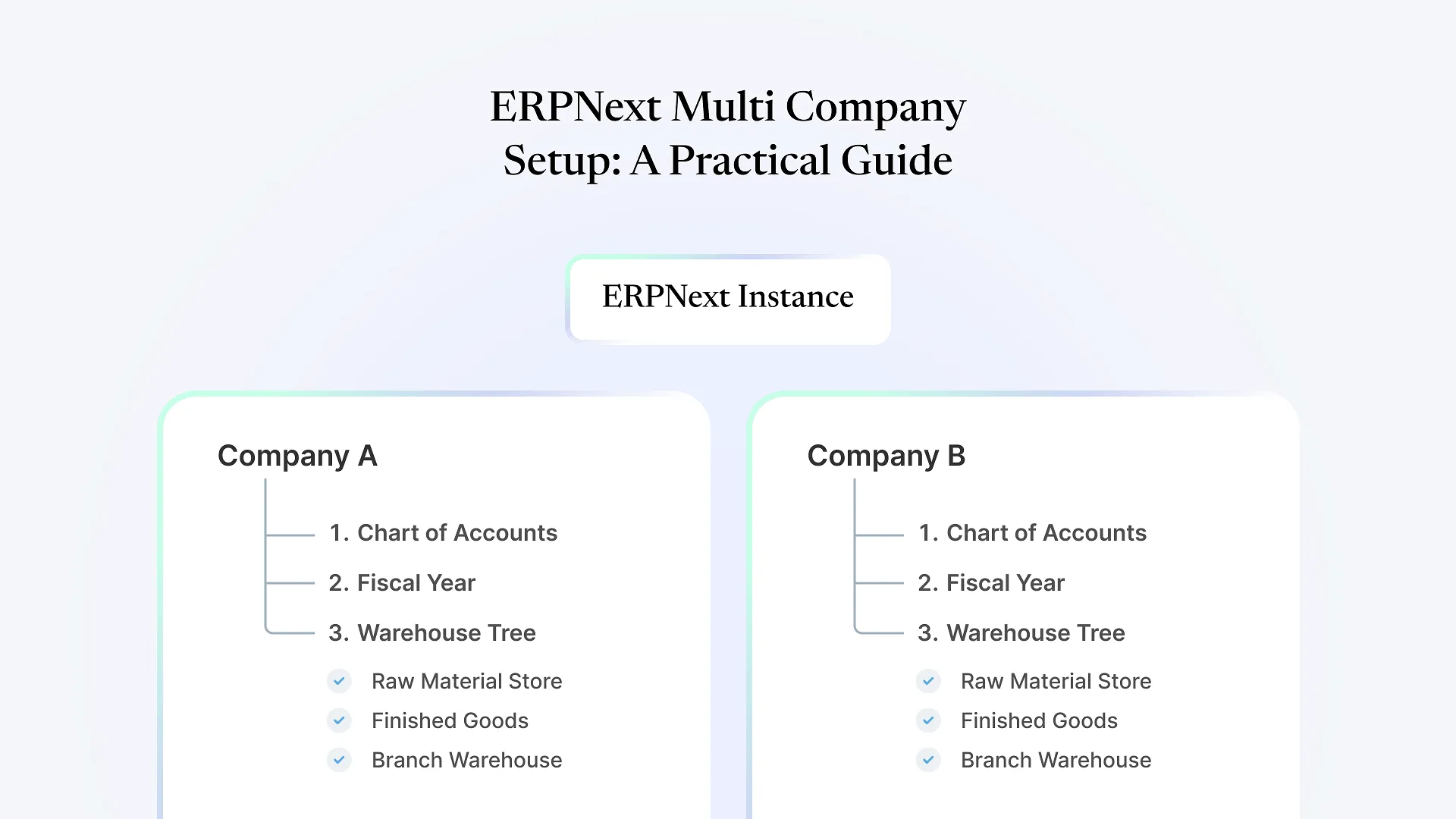
If you run more than one legal entity — a manufacturing company and a trading arm, a domestic business and a Middle East branch, a parent with a few sister concerns — the question isn’t whether ERPNext can technically hold multiple companies. It can. ERPNext multi company setup works by letting one ERPNext instance host several separate companies, each with its own chart of accounts, fiscal year, and warehouses, while linking them through inter-company transactions whenever they buy from or sell to each other. The real question is whether that’s the right structure for your group, and what you need to get right before you configure anything.
That second question is the one most guides skip. This one doesn’t.
What ERPNext Multi Company Setup Actually Means
In ERPNext, a Company is a top-level entity with its own chart of accounts, fiscal year, currency, and set of default accounts (bank, receivables, payables, and so on). You can create as many companies as you need inside a single ERPNext instance, and each one is financially independent: a sales invoice raised under Company A does not touch Company B’s books unless you deliberately connect them.
Warehouses sit underneath companies, not alongside them. Every warehouse belongs to exactly one company. So if your group has a manufacturing unit in Ahmedabad and a distribution unit in Dubai, and you set them up as two companies, each will have its own warehouse tree — you can’t casually stock-transfer between a warehouse in Company A and a warehouse in Company B the way you would between two warehouses inside the same company. That distinction trips up more founders than anything else in this setup, and it’s worth sitting with before you build anything.
Within a single company, though, multiple warehouses are straightforward. A company can have a raw material store, a finished goods warehouse, a rejection or QC holding area, and a warehouse per branch or retail location, all reporting into the same set of books. Stock transfers, valuation, and reorder levels all work per-warehouse but roll up to one consolidated inventory picture for that company.
One Instance or Separate Instances — The Decision That Actually Matters
Before you configure a single warehouse, decide this: should your entities live in one ERPNext instance as multiple companies, or should some of them run as entirely separate ERPNext installations?
One instance, multiple companies, tends to make sense when:
The entities are related and you'll regularly need consolidated visibility: total group revenue, combined cash position, or a shared customer/vendor master.
They share people. The same finance team closes books for both, the same procurement team buys for both, the same MD wants one dashboard.
They trade with each other reasonably often, such as a manufacturing company selling to its own distribution arm, which is exactly what inter-company transactions in ERPNext are built to handle.
The entities are only loosely related: a shared holding structure but genuinely independent operations, teams, and systems.
Data segregation matters for regulatory, ownership, or confidentiality reasons beyond what role-based permissions can reasonably enforce.
The businesses differ enough in process, such as a manufacturing operation paired with an unrelated services business, that sharing item masters, workflows, and customizations would mean constantly working around each other's configuration.
There’s no universally correct answer here; it depends on how your entities actually operate, not on what looks tidier on paper. Founders often default to “one instance for everything” because it seems simpler, then find a year or two in that two unrelated businesses have been quietly fighting over shared item codes and approval workflows the whole time.
Not sure yet which side of that split fits your business? That usually depends on details specific to your entities, not a generic rule — worth talking through before you build around the wrong assumption.
If you’re still weighing what a setup like this costs to get right, we’ve broken down ERPNext implementation costs in India separately, worth reading alongside this if you’re at the budgeting stage.
How Inter-Company Transactions Actually Work
Both companies are set up with compatible item masters. The item being transferred needs to exist, correctly, in both companies.
Someone has thought through transfer pricing: what price Company A "sells" to Company B at, since that affects both companies' reported margins.
Your finance team understands that inter-company transactions need to be excluded when looking at true consolidated (group-level) numbers, since otherwise you'll double-count revenue that's really just inventory moving internally.
Common Mistakes in Multi-Company, Multi-Warehouse Setups
If two business units need genuinely separate financials, statutory compliance, or ownership structures, they need to be separate companies, not two warehouses under one company with a workaround for keeping the books apart. This one is expensive to fix after go-live because it means re-platforming transaction history.
Each company gets its own chart of accounts, and ERPNext will let you set each one up differently. That flexibility becomes a liability if your finance team later wants comparable, consolidated reporting across companies and the account structures don't line up.
With multiple warehouses, especially across branches or locations, who can see stock, approve transfers, and adjust valuation needs to be scoped deliberately. Left on defaults, this either locks out people who need visibility or exposes stock data across locations that shouldn't see each other's numbers.
Company and warehouse structure isn't something you configure once and forget. New branches, new legal entities from expansion, or a decision to spin off a division all mean revisiting the structure. Setups that assume the current shape is permanent tend to need rework within a couple of years.
These are patterns we see often, including in structures we’ve been brought in to untangle after another vendor or an in-house team set them up without thinking through the company/warehouse boundary first.
For the warehouse side specifically — barcode tracking, bin-level accuracy, and multi-location stock visibility — our warehouse management system work covers what a properly configured multi-warehouse setup looks like in practice once the company structure itself is settled.
Frequently Asked Questions
The cost of getting company and warehouse structure wrong isn’t in the initial setup — it’s in the eighteen months of transactions you’ll eventually need to migrate once someone notices the structure doesn’t match how the business actually operates. If you’re mapping out an entity and location structure for the first time and want a second opinion before committing to one, book a free ERPNext consultation — we’ll look at your actual companies and warehouses rather than a generic template, and tell you honestly if a single instance fits or if it doesn’t.