





What does HSN SAC code management software do?
It stores the correct HSN (goods) or SAC (services) code against each item in your master data, applies the matching GST rate through linked tax templates, prints the code on invoices and e-invoices, and rolls it up into the HSN-wise summary in GSTR-1. In ERPNext, this runs through the item master and the India Compliance app.
Why HSN/SAC Mapping Is More Than a Labelling Exercise
Most finance teams know the digit rule. Under Notification 78/2020, businesses with aggregate annual turnover in the previous financial year of up to ₹5 crore must report at least 4-digit HSN codes on B2B invoices. Businesses above ₹5 crore must report 6 digits on all invoices.
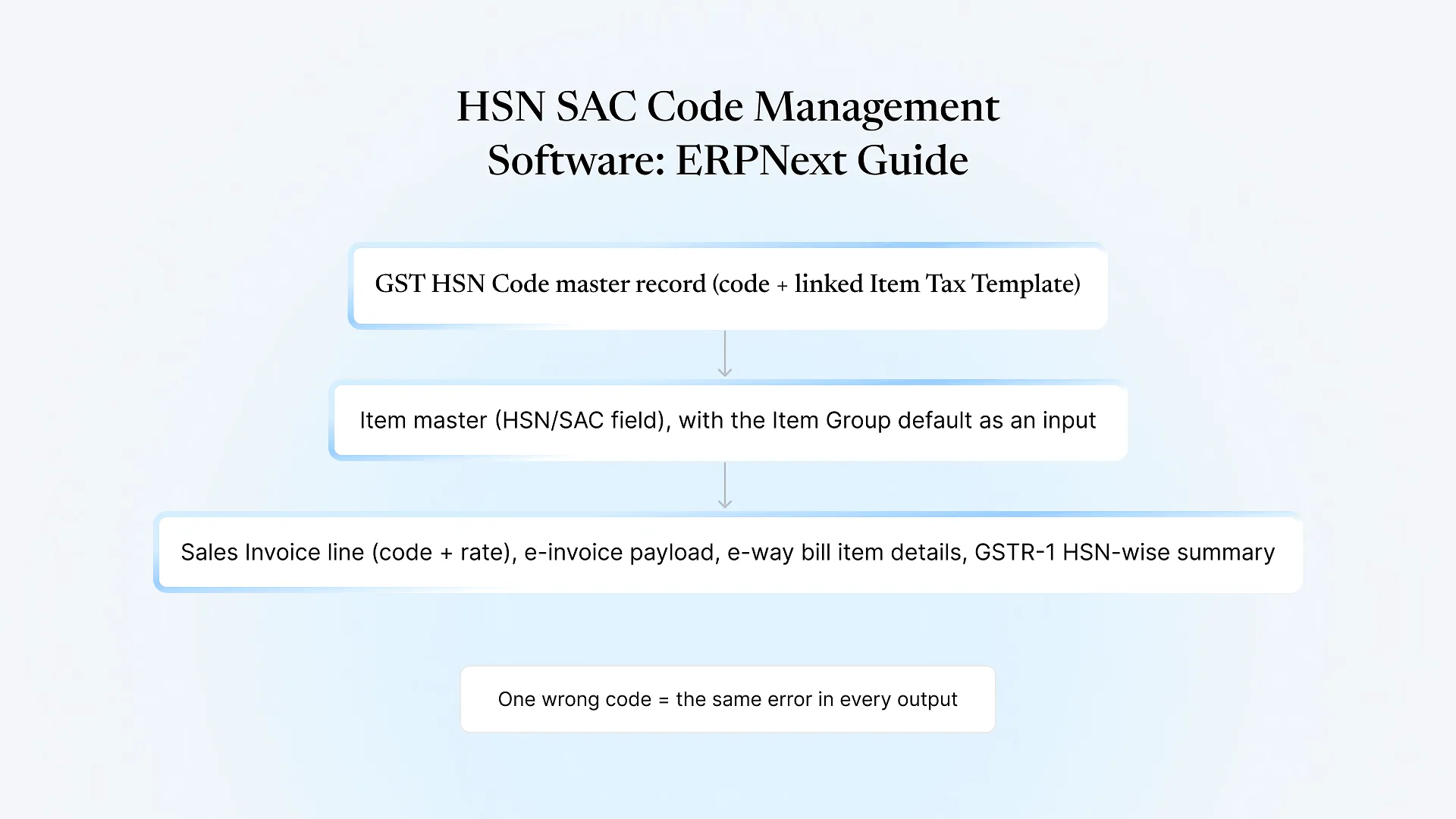
The digit rule is the easy part. The harder part is that one code feeds several outputs at once:
The GST rate applied on the invoice line
The code printed on the tax invoice and sent in the e-invoice payload
The HSN-wise summary in GSTR-1 Table 12
The item details on e-way bills
What HSN SAC Code Management Software Should Do in ERPNext
ERPNext with the India Compliance app keeps codes in a dedicated GST HSN Code master. Each item links to one code through its HSN/SAC field. Services use the same master, and SAC codes are simply the ones that begin with 99. So a separate SAC code ERP setup isn’t needed; service items just need the same attention as stock items.
The GST HSN Code record can also hold Item Tax Templates. This is what turns HSN code mapping in ERPNext from labelling into real tax logic: when the code carries the right template, every item linked to it gets the correct rate.
Item Groups can also hold a default HSN code in current India Compliance versions, so new items in the group start with a sensible value instead of a blank. Check this against the version you’re running.
A Practical Approach to Mapping
Step 1: Clean the master before you map
Step 2: Use Item Groups for defaults, items for the final value
Step 3: Attach tax templates to codes, not only to items
Step 4: Turn on validation
Step 5: Test with real transactions
Before go-live, raise sample invoices for each major product and service category. Check the HSN-wise summary report against what your CA expects for GSTR-1, and generate a test e-invoice. The e-invoice portal validates HSN codes, so an invalid code gets rejected there rather than slipping through.
If you aren’t sure your current item master would pass Step 1, that’s usually the right place to start a review.
Keeping Codes Accurate After Go-Live
Decide who owns HSN changes
In the ERPNext setups we audit or take over, loosely governed GST masters are a common root cause of return problems. The usual failure isn't a wrong initial mapping. It's uncontrolled edits: a purchase user creates an item with a guessed code, or someone changes a code to get an invoice to submit.Limit edit rights on the HSN field and the GST HSN Code master to a small group, usually finance plus one named compliance owner. Use ERPNext's role permissions for this rather than relying on a policy document.
Handle rate and classification changes deliberately
When a notification changes the rate for a code, update the tax template from the effective date onward. Submitted invoices in ERPNext are locked by design. Correct past errors with credit or debit notes, not by trying to edit history.
Watch mixed-supply and service lines
Businesses that sell goods and also bill installation, AMC or freight often leave SAC codes blank on those service items. The result is service lines missing from the HSN summary.
Multi-country groups
If you run Indian and GCC entities on one ERPNext instance, HSN discipline applies to the Indian company. VAT in the Gulf is configured differently. Keep India-specific validation scoped to the Indian company so it doesn't get in the way elsewhere.
Common HSN/SAC Mistakes and How to Fix Them
| Mistake | What happens | Fix |
|---|---|---|
| Code typed into the print format only | Returns and e-invoices miss it | Store it on the item |
| Short codes accepted | Table 12 flagged or rejected | Enable minimum-digit validation |
| Same product, different codes | Inconsistent rates and summaries | Deduplicate during cleanup |
| SAC left blank on service items | Service lines missing from HSN summary | Map service items explicitly |
| Rate set only at item level | One rate change needs many edits | Move the tax template to the HSN code |
Frequently Asked Questions
Getting Your HSN Mapping Right
HSN and SAC codes are a master-data problem disguised as an invoicing detail. Fix the structure (codes on the master, tax templates on the codes, validation on entry, a named owner) and the same error stops repeating across invoices, e-invoices, e-way bills and returns.
Aavatto sets up and cleans up GST configuration as part of our tailored ERPNext implementation work, including setups inherited from other vendors. If you’d like a second pair of eyes on your item master and HSN mapping before your next filing cycle, book a free ERPNext consultation.