




If your purchase team sends RFQs from Outlook and pastes replies into a spreadsheet, the problems are familiar. Quotes arrive in different formats, someone compares an outdated revision, and months later nobody can show why a supplier won the order. Many teams start looking for separate RFQ vendor quotation software at this point. If you run ERPNext, you may not need it.
Can ERPNext work as RFQ vendor quotation software? Yes. ERPNext’s Buying module lets you raise a Request for Quotation, send it to several suppliers by email or through a supplier portal, record each reply as a Supplier Quotation, compare quotes side by side, and convert the chosen one into a Purchase Order, with every document linked.
The documents are the easy part. What decides whether this works is how clearly your team has defined the buying decision before anyone configures a form.
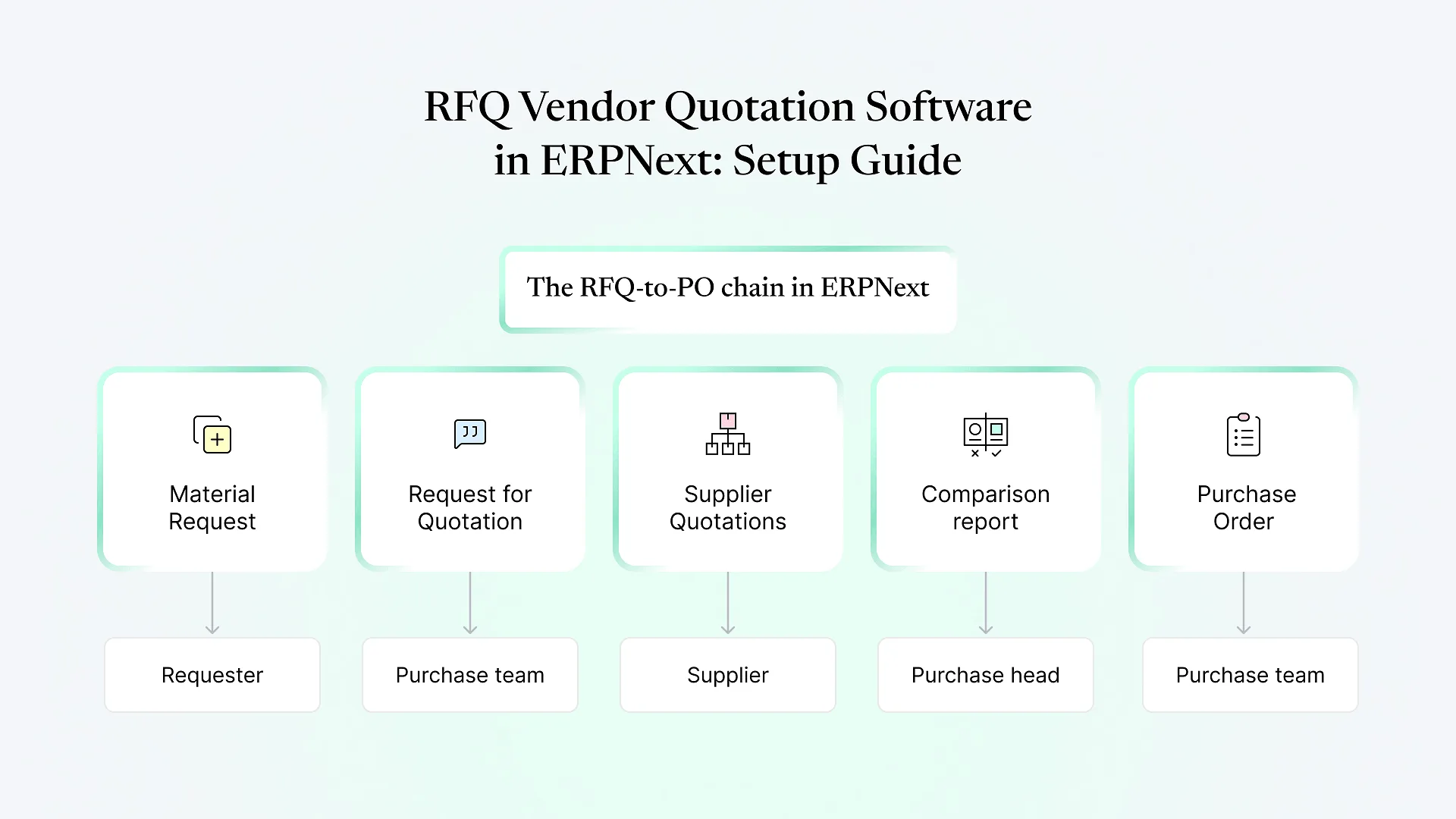
How the RFQ workflow in ERPNext fits together
Material Request
stores, production or a department raises the need.
Request for Quotation (RFQ)
purchase selects suppliers and sends the request.
Supplier Quotation
one per supplier reply, entered by your team or created when the supplier responds on the portal.
Supplier Quotation Comparison report
lines up the quotes item by item.
Purchase Order
created from the winning Supplier Quotation.
Step-by-step: setting up RFQs in ERPNext
A comparison is only as reliable as the data behind it. Group suppliers sensibly using Supplier Groups, make sure each has a contact with a working email address, and check that items carry the right units of measure.If one supplier quotes per kilogram and another per roll, the comparison will mislead you unless UOM conversion factors are set on the item.
Most teams create RFQs from a Material Request so the requirement and the quotes stay connected. For one-off buys such as services or capital items, raising an RFQ directly is reasonable.Agree in writing which purchase categories must start with a Material Request. Without that rule, the traceability described above quietly disappears.
On the RFQ, add items, quantities and required-by dates, then add the suppliers you want to invite. The message to suppliers and the terms go out with the request.Write these once as reusable templates covering delivery terms, payment expectations and the quote deadline. Consistent wording is what makes replies comparable later.
ERPNext can send each supplier a link to the supplier portal, where they enter rates directly and a draft Supplier Quotation is created for you. That removes retyping, but suppliers need a portal login, and some smaller suppliers will keep replying by email or PDF regardless.Plan for both: portal access for regular suppliers, manual Supplier Quotation entry for the rest.
Whether the supplier enters it or your team does, each reply should become a Supplier Quotation linked to the RFQ. Always set the valid-till date.A quote without a validity date tends to get reused months later at a price the supplier no longer honours.If you're halfway through this list and finding that your current process doesn't map neatly onto these steps, that's common. Sorting out that mapping is usually the first thing we work through with procurement teams.
Vendor quotation comparison in ERP: looking past the lowest price
The standard Supplier Quotation Comparison report groups quotes by item and shows each supplier’s rate, so the cheapest option stands out. For commodity purchases, that’s often enough.
For purchases where delivery reliability, payment terms or quality carry real weight, purchase heads usually need a fuller picture. Here’s how the common criteria typically line up:
| What you want to compare | Standard ERPNext | Typical approach |
|---|---|---|
| Unit price per item | Shown in the comparison report | Use as-is |
| Lead time / delivery date | Captured on the quotation | Review alongside price, or surface it in the comparison view |
| Payment terms | Captured per quotation | Usually needs to be brought into the comparison view |
| Freight, packing and other charges | Not combined into one comparable figure by default | Custom fields plus a script report |
| Supplier track record | Held separately in Supplier Scorecard | Pull the score into the decision view |
| Splitting an order across suppliers | Possible by creating Purchase Orders from different quotations | Agree splitting rules before RFQs go out |
Exact report columns vary between ERPNext versions, so check what yours shows before deciding what to build.
A practical pattern is a short weighted scorecard covering price, delivery, payment terms and past performance, with weights the purchase head fixes before the RFQ goes out. Fixing weights in advance stops the criteria from shifting to suit a preferred supplier. Whether the scorecard lives in a custom report or a structured approval note depends on how many RFQs you run each month.
Comparing quotes across currencies and tax treatments
Teams buying across India and the Gulf regularly receive quotes in different currencies, and some suppliers quote tax-inclusive while others don’t. ERPNext records the currency on each Supplier Quotation, but your comparison is only fair if everyone is on the same basis.
Two simple rules prevent most errors: ask suppliers to quote rates excluding GST or VAT, with tax shown separately, and compare in your company currency at an agreed exchange rate for that RFQ.
Adding approvals and controls
Frappe’s Workflow feature lets you add approval states to Supplier Quotations or Purchase Orders, for example requiring the purchase head to approve anything above a set value.
Keep it light. One or two approval levels by value suits most mid-sized teams. Long approval chains are the most common reason buyers start working around the system.
When standard ERPNext needs customization
Standard ERPNext handles the document chain well. Teams typically look at ERPNext customization when they need:
Freight and other charges rolled into one total-cost figure for comparison
A technical or quality evaluation recorded before commercial comparison
Sealed-bid rules, where quotes stay hidden from buyers until a deadline
Comparison of the same item across several RFQs
Common mistakes when setting up RFQs in ERPNext
Switching on the portal without onboarding suppliers
Nobody uses it, and buyers go back to email.
Skipping the Material Request link
You lose the trail from requirement to purchase.
Leaving validity dates blank
Expired prices get reused.
Exporting to Excel to compare
The version-confusion problem returns.
Over-engineering approvals
Buyers bypass the process to meet deadlines.
Frequently Asked Questions
Getting your RFQ process into ERPNext
ERPNext already covers the mechanics of sending RFQs and collecting quotes. What decides whether your team actually uses it is how well the setup matches the way they choose suppliers.
If you’d like help mapping that out as part of a tailored ERPNext implementation, book a free ERPNext consultation. Bring one recent RFQ and the quotes you received, and we’ll walk through how it would run in ERPNext.