For HR and operations leaders running shift-based teams across multiple plants or branches, “shift management software” usually gets treated as one thing — a scheduling tool. But scheduling who’s supposed to work is a different problem from confirming who actually did, and the gap between those two is where most attendance and payroll disputes start.
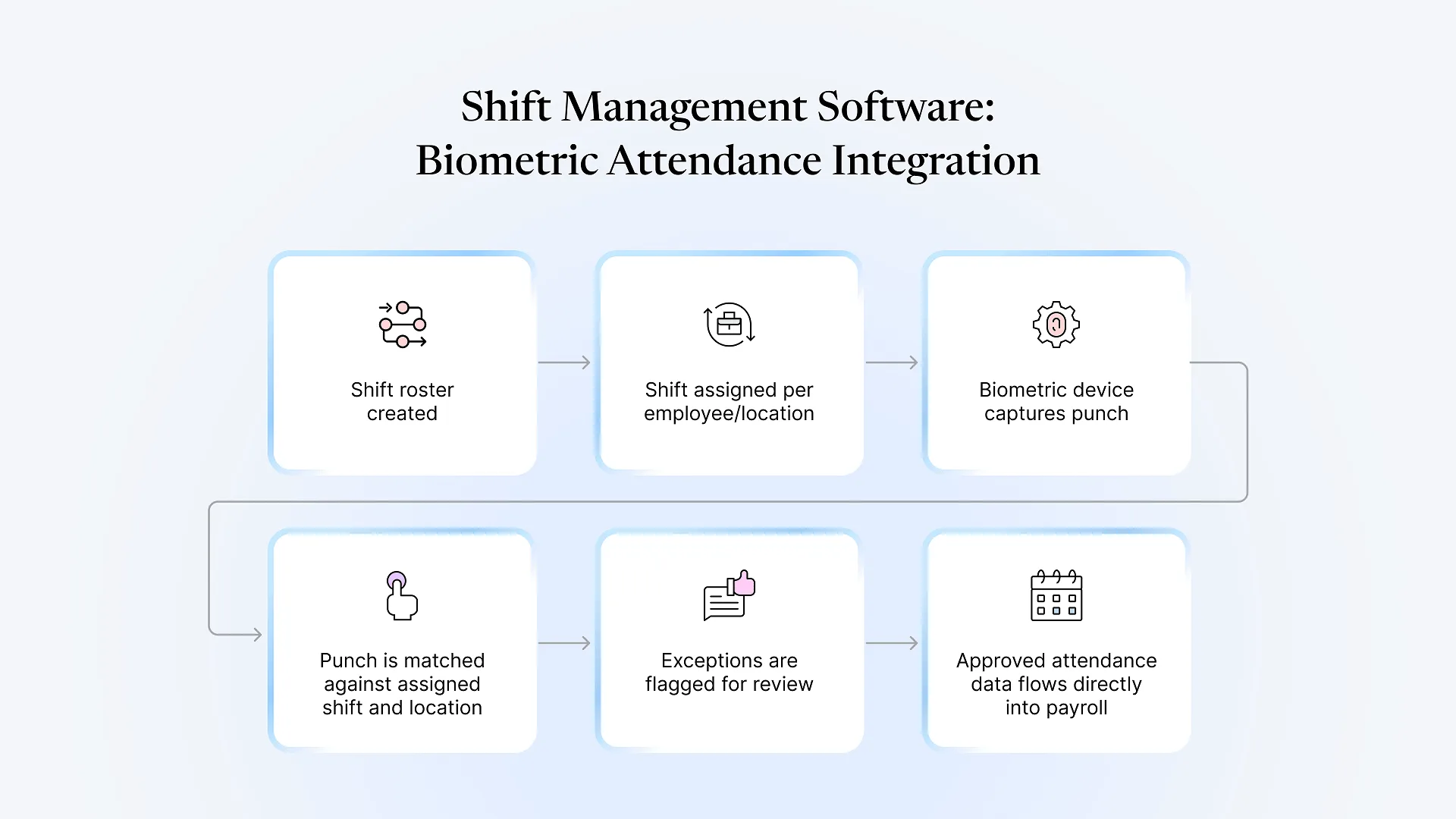
Shift management software plans and tracks employee work schedules — rotating shifts, multiple locations, overtime rules, shift-based leave. On its own, it only manages the roster. The operational payoff comes from connecting it to biometric attendance devices and payroll, so a clock-in is automatically checked against the assigned shift instead of being reconciled by hand every cycle.
That distinction is worth sitting with, because most vendor pages on this topic list scheduling features — shift swaps, rotation templates, overtime alerts — without addressing what happens after a shift ends: whether the punch data actually lines up with what was scheduled, and whether payroll can trust that data without someone re-checking it in a spreadsheet first.
Why Scheduling Alone Doesn't Solve the Problem
A shift roster answers one question: who is supposed to be where, and when. It doesn’t answer whether they showed up, left early, worked through a break they weren’t supposed to, or clocked in at the wrong location entirely — all of which are routine in multi-plant or multi-branch operations with rotating crews.
For a single-location team on a fixed shift, this gap is manageable with a supervisor’s sign-off. For a business running two, three, or more sites with staggered shifts, it isn’t. Someone has to manually cross-check biometric punch logs against the planned roster for every employee, every day, across every location — and that reconciliation work is exactly where attendance disputes, payroll errors, and compliance gaps show up.
What Biometric Attendance Integration Actually Does
“Integration” is a vague word in most product descriptions. Mechanically, what it means is that a biometric device — fingerprint, face, or card-based — doesn’t just log a timestamp; it logs a timestamp against a specific employee’s assigned shift for that day, at that location. The system then applies that employee’s shift rules automatically: is this punch within the grace window, is it a late arrival, does it cross into overtime, does it match the location they were rostered to.
Without that link, a biometric device is just a clock. Someone still has to look up what shift each punch was supposed to belong to and apply the rules by hand — which is manageable for twenty employees at one site and unworkable for a few hundred spread across shifts and plants.
What Breaks When Shift, Attendance, and Payroll Stay Separate
Payroll runs on stale or manually corrected data
If attendance isn't tied to the actual shift assignment, payroll teams end up applying overtime and late-deduction rules manually, which is slow and inconsistent across locations.
Shift changes don't propagate
A last-minute shift swap or roster change made in a scheduling tool has to be manually re-entered wherever attendance is captured, or the biometric system flags a correctly-working employee as "not on shift."
Multi-location visibility disappears
HR at head office can't see real-time attendance across plants without pulling separate exports from each site's device or software and reconciling them centrally.
Compliance reporting becomes a monthly fire drill
Statutory attendance and overtime records get assembled from multiple sources right before a filing deadline instead of being available on demand.
Evaluating Shift Management Software: What to Check Beyond the Feature List
or does someone need to manually assign which shift a punch belongs to?
different grace periods, overtime thresholds, or break rules per plant — without separate configuration per site?
to attendance capture, or is there a sync delay or manual step?
or is there an export/import step where errors can creep in?
does the shift assignment logic still apply once data syncs back, or does it require manual correction?
How This Works Inside Frappe HRMS
Frappe HRMS handles shift assignment, biometric attendance capture, and payroll as parts of one system rather than as connected tools. A shift type is defined once — with its own grace period, overtime rule, and location — and assigned to employees individually or in bulk. Biometric devices push punch data in through standard integration methods, and it’s checked against that employee’s shift assignment automatically, with exceptions surfaced for review rather than buried in a raw log.
Because it sits on the same ERPNext data model as payroll, an approved attendance record for a pay period feeds directly into payroll processing without a manual export step. For a business already on ERPNext, or considering it, that also means shift and attendance data live alongside the same employee, cost center, and location records used elsewhere in the system, rather than in a parallel HR tool that has to be kept in sync by hand.
This isn’t a claim that biometric integration is simple to set up correctly across multiple plants with different shift patterns — device connectivity, location-specific rules, and legacy attendance data migration all take real configuration work. But it’s a fundamentally different starting point than stitching together a scheduling app, a biometric vendor’s software, and a payroll system that don’t share a data model.
If your team is currently reconciling shift rosters against biometric exports by hand, see our HRMS implementation approach for what it takes to move that onto one connected system.