



If you run finance on ERPNext, you don’t need a spreadsheet to produce your core statements. Financial statements in ERPNext are standard reports that read straight from the General Ledger, so they are only as reliable as the ledger underneath them. This guide explains how each report works, what has to be configured first, and where finance teams typically get caught out.
Can ERPNext generate financial statements directly? Yes. ERPNext includes built-in Profit and Loss Statement, Balance Sheet and Cash Flow reports that calculate live from posted General Ledger entries. You can run them by company, fiscal period, cost center or finance book, compare periods side by side, and export to Excel or PDF. Accuracy depends on a well-structured chart of accounts.
How financial statements in ERPNext are built
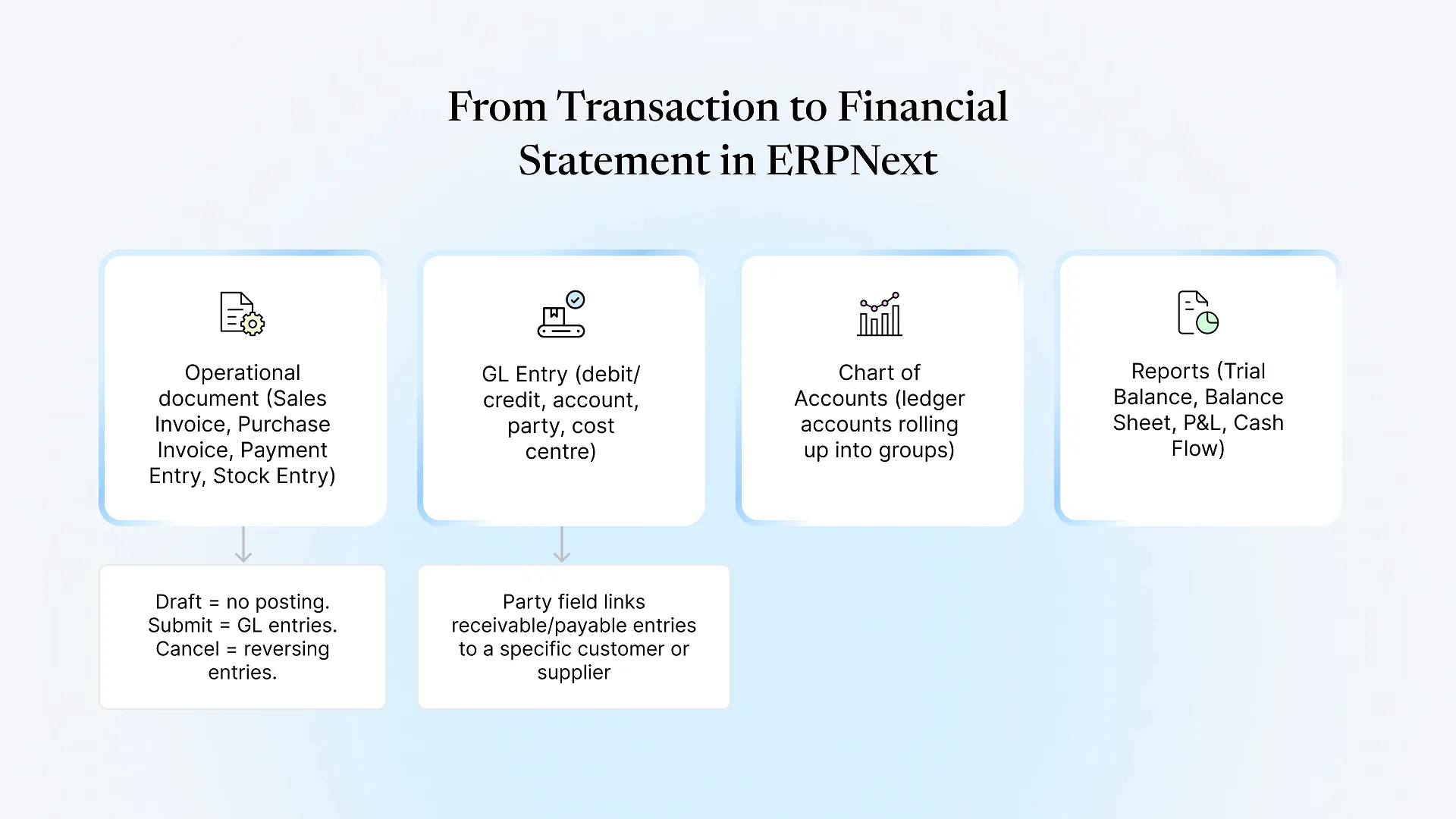
Every transaction in ERPNext (a sales invoice, a purchase receipt, a payment, a stock entry, a depreciation run) posts debit and credit lines to the General Ledger. The statements don’t store their own numbers. They group those ledger lines by account and roll them up through the chart of accounts tree.
That design has one practical consequence for a finance team: there is no separate “reporting” step to reconcile. If the P&L looks wrong, the fix is almost always upstream, in how an account is classified or how a transaction was posted.
Three settings on each ledger account decide where it lands:
Root type (Asset, Liability, Equity, Income, Expense) decides whether it appears on the balance sheet or the P&L.
Parent group decides which line it rolls up into, such as "Current Assets" or "Indirect Expenses."
Account type (Receivable, Payable, Stock, Fixed Asset, Depreciation, Bank, Cash and others) drives system behaviour and, importantly, how the cash flow report classifies movements.
The ERPNext P&L, balance sheet and cash flow reports, one by one
The P&L sums every Income and Expense account over the period you choose. You can show it monthly, quarterly, half-yearly or yearly across a date range, which gives you a period-over-period view without building a pivot table.Two filters matter most to finance heads. Cost Center lets you see profitability by branch, plant or business unit, provided transactions were tagged with a cost center when they were posted. Project does the same for project-based businesses. If tagging was inconsistent, segment P&Ls will be incomplete even though the company-level total is correct.
ERPNext's cash flow report uses the indirect method. It starts from net profit for the period and adjusts for non-cash items and changes in working capital, then groups movements into operating, investing and financing activities.This is where setup matters most. The report decides which bucket a movement belongs to by reading each account's account type. If a fixed asset account was created without the "Fixed Asset" type, or a loan account sits under the wrong group, the cash flow statement will put the movement in the wrong section. The totals will still tie to your bank and cash balances, which is why the error often goes unnoticed until an auditor asks about it.
Filters you'll use across all three
| Filter | What it does | When finance teams use it |
|---|---|---|
| Company | Runs the report for one legal entity | Always; required |
| Period and periodicity | Sets the date range and monthly/quarterly/yearly columns | Monthly MIS, quarterly board packs |
| Cost Center | Limits to one branch, plant or department | Segment profitability |
| Finance Book | Uses a specific set of books | Tax vs. management depreciation |
| Accumulated values | Shows running totals instead of period movement | Year-to-date views |
| Presentation currency | Shows figures in another currency | Group reporting across India and GCC entities |
What has to be right before the statements are right
A chart of accounts designed for your reporting, not copied from a template. The default chart works for many businesses, but your board pack and your auditor's schedules should shape the groups.
Correct account types on every ledger, especially bank, cash, receivable, payable, stock, fixed asset and depreciation accounts.
Mandatory cost centers or accounting dimensions on the transactions where segment reporting matters, set up before go-live rather than backfilled.
Opening balances that tie to your last audited trial balance. Statements built on a mismatched opening will carry that gap into every period.
Perpetual inventory settings you understand. When stock is valued in real time, stock movements post to the ledger automatically, which changes how cost of goods sold appears on the P&L.
Most of these decisions are made once, during a tailored ERPNext implementation, and are expensive to unpick later. In projects where we’ve been asked to review or rescue an existing ERPNext setup, misclassified account types and inconsistent cost-center tagging are among the first things we check, because they quietly undermine reports that otherwise look complete.
If your cash flow or segment P&L doesn’t match what you expect, a short review of your chart of accounts usually finds the cause faster than rebuilding reports.
A month-end routine for reliable statements
Reconcile bank accounts using Bank Reconciliation, so cash balances are final
Review the Accounts Receivable and Accounts Payable ageing reports and clear unallocated payments.
Post depreciation and any accruals or provisions through journal entries.
Check the Stock vs. Account Value comparison if you use perpetual inventory.
Run the Trial Balance and confirm debits equal credits for the period.
Generate the P&L, balance sheet and cash flow, then compare against the prior period for unusual swings.
At year end, post the Period Closing Voucher after the audit adjustments are in.
Where the standard reports stop
No automatic notes to accounts
Schedules and disclosures required under Ind AS or IFRS still need to be prepared separately, though ERPNext data feeds them.
Fixed layouts
The statements follow your chart of accounts structure. If your board wants a different grouping, such as EBITDA as a separate line or a management P&L that reclassifies costs, you either restructure the chart or build a custom report.
Cash flow precision depends on account types
There is no manual override per transaction in the standard report.
These are the usual reasons companies invest in ERPNext customization: custom print formats for board packs, a management P&L with its own groupings, or dashboards that show the same numbers to non-finance leaders without giving them ledger access.