




Purchase approval workflow software routes each purchase request or order to the right approvers based on rules such as value, department, or item category. It records who approved what and blocks orders from going out unapproved. ERPNext does this natively through its Workflow engine, so most manufacturers and distributors don’t need a separate tool.
That’s the short answer. The longer one depends on how your approval hierarchy is designed. Most approval problems we see in ERPNext projects start before anyone opens the Workflow screen. A sign-off chain that only exists in people’s heads can’t be configured, however good the software is.
This guide covers designing the hierarchy, mapping it to ERPNext, and handling the edge cases that make approvals leak.
Step Zero: Decide Where the Money Is Actually Committed
Most companies try to add approvals to every procurement document and end up with three sign-offs for one purchase. Ask a simpler question first: at which document does the company become committed to spending?
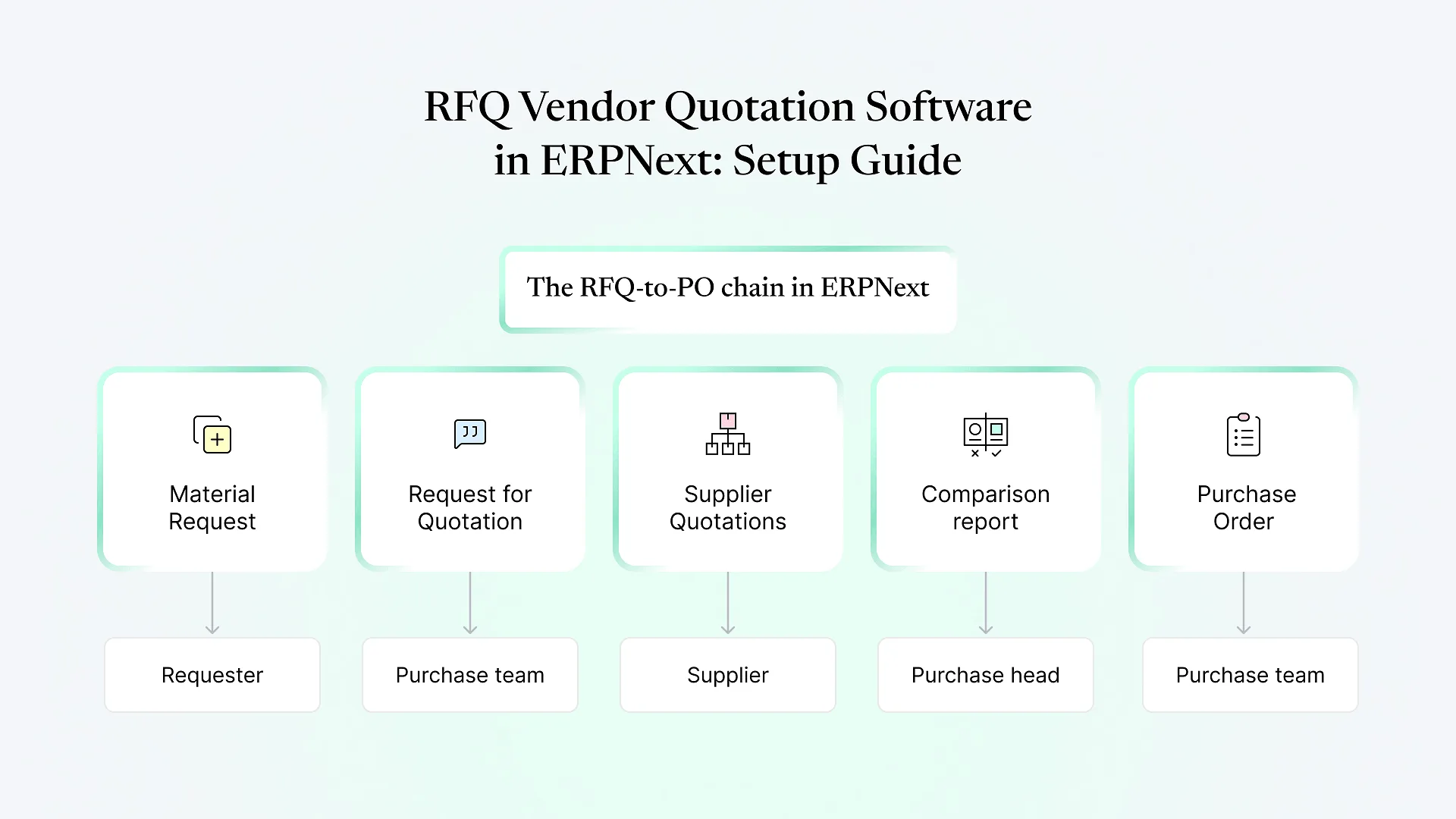
In ERPNext, the procurement chain usually runs like this:
Material Request
Someone says "we need this." No money is committed.
Request for Quotation / Supplier Quotation
Prices are gathered. Still no commitment.
Purchase Order
Sent to the supplier. This is the commitment.
Purchase Invoice / Payment Entry
money actually leaves.
Designing Your Purchase Approval Hierarchy
| PO value (illustrative) | Raw materials | Capex / machinery | Services & maintenance |
|---|---|---|---|
| Up to Band A | Purchase Manager | Plant Head | Department Head |
| Band A to Band B | Purchase Manager → Plant Head | Plant Head → Finance Head | Department Head → Finance Head |
| Above Band B | Purchase Manager → Plant Head → Director | Plant Head → Finance Head → Director | Department Head → Finance Head → Director |
Who the approver is depends on more than value
Capex almost always needs finance involvement earlier than raw material buying does.
Some approvers are roles, others are specific people
"Director" might be one person. "Plant Head" differs by plant.
There are exceptions nobody has written down
Examples include emergency breakdown purchases, repeat orders against an annual rate contract, or imports needing a different sign-off.
How ERPNext Handles Multi-Level Sign-Off
A Workflow is attached to a document type such as Purchase Order. You define:
States
for example Draft → Pending Purchase Manager → Pending Plant Head → Pending Director → Approved → Rejected
Transitions
which role can move the document from one state to the next, using which action (Approve, Reject, Send Back)
Conditions
expressions on a transition, such as only requiring Director approval when the grand total is above a threshold, or routing differently by cost center or purchase type
Document status per state
"Approved" maps to Submitted, so the PO only becomes a committed document once the final approval is in
Authorization Rules set a ceiling: for example, Purchase Orders above a given grand total need approval from a particular role or user. They're quick to set up for one threshold. They don't model a sequence of approvers, though, and they can confuse users when combined with Workflows. For a genuine multi-level sign-off ERP setup, Workflow is the right foundation. Use Authorization Rules sparingly, if at all.
Setting Up a Purchase Approval Hierarchy in ERPNext: The Practical Sequence
Create the roles first
Map each approver in your matrix to a role (Purchase Approver L1, L2, Finance Approver, and so on). Assign roles to users, and use Role Profiles if several people share a set.
Restrict by plant or department where needed
If "Plant Head" means a different person per plant, use User Permissions on Company, Warehouse, or Cost Center so each approver only sees their own POs.
Define Workflow States
that match your matrix, including a Rejected state and, ideally, a "Sent Back for Revision" state.
Build the transitions with conditions
Start with value-based routing, then add category or cost-center conditions. Keep conditions readable. If they grow long and nested, the matrix is probably too complicated.
Decide on self-approval
Each transition has an "Allow Self Approval" setting. Turn it off for any transition where the creator might also hold the approver role.
Turn on notifications
Workflow actions can notify the next approver by email. Many teams also add an in-app or WhatsApp notification so approvals don't sit unseen.
Test with real past POs
across every band and category before go-live. Most mistakes show up here, usually as a condition that misses an edge value.
The Edge Cases That Make Approvals Leak
| Gap | What happens | How to close it |
|---|---|---|
| Edits after approval | A PO is approved, then the quantity or rate is changed | Approved = Submitted; changes require Cancel & Amend, which restarts the workflow |
| Approver on leave | POs pile up in one state | Assign the role to a backup user, or build a delegation mechanism (usually custom) |
| Creator holds approver role | A manager raises and approves their own PO | Disable self-approval on that transition |
| Splitting orders | One large purchase is split into several POs to stay under a band | Review supplier-wise PO reports regularly; consider budget controls |
| Budget overrun | Approved PO exceeds the cost center's budget | Use ERPNext Budgets with "Stop" or "Warn" actions on Purchase Order |
| Workflow changed mid-year | Existing documents are stuck in states that no longer exist | Migrate open documents before changing states |
Do You Need Separate Purchase Approval Workflow Software?
Standalone approval tools are good at what they do: clean mobile approvals, Slack or Teams integration, and polished request forms. The tradeoff is a second system. Approved requests have to sync into your ERP, budgets live in one place while commitments live in another, and the audit trail is split.
If ERPNext is already your system of record for purchasing, inventory, and accounts, a well-designed Workflow covers what most manufacturers and distributors need. A separate tool makes more sense when many non-ERP users (site staff, field teams) raise requests and will never log into the ERP. Even then, ERPNext’s web portal or a lightweight custom request form is often enough.
Frequently Asked Questions
Getting the Hierarchy Right Before the Configuration
The configuration in ERPNext is the easy part. The harder work is agreeing on who signs off on what, writing down the exceptions, and closing the gaps where spend slips through. Aavatto has been building and fixing ERPNext and Frappe setups since 2020 for businesses across India and the Middle East. Approval design is one of the areas we’re asked to revisit most often.
If you want a second pair of eyes on your current approval matrix, or help designing one, book a free ERPNext consultation. We’ll walk through how your purchase sign-off works today and what it would look like in ERPNext.