



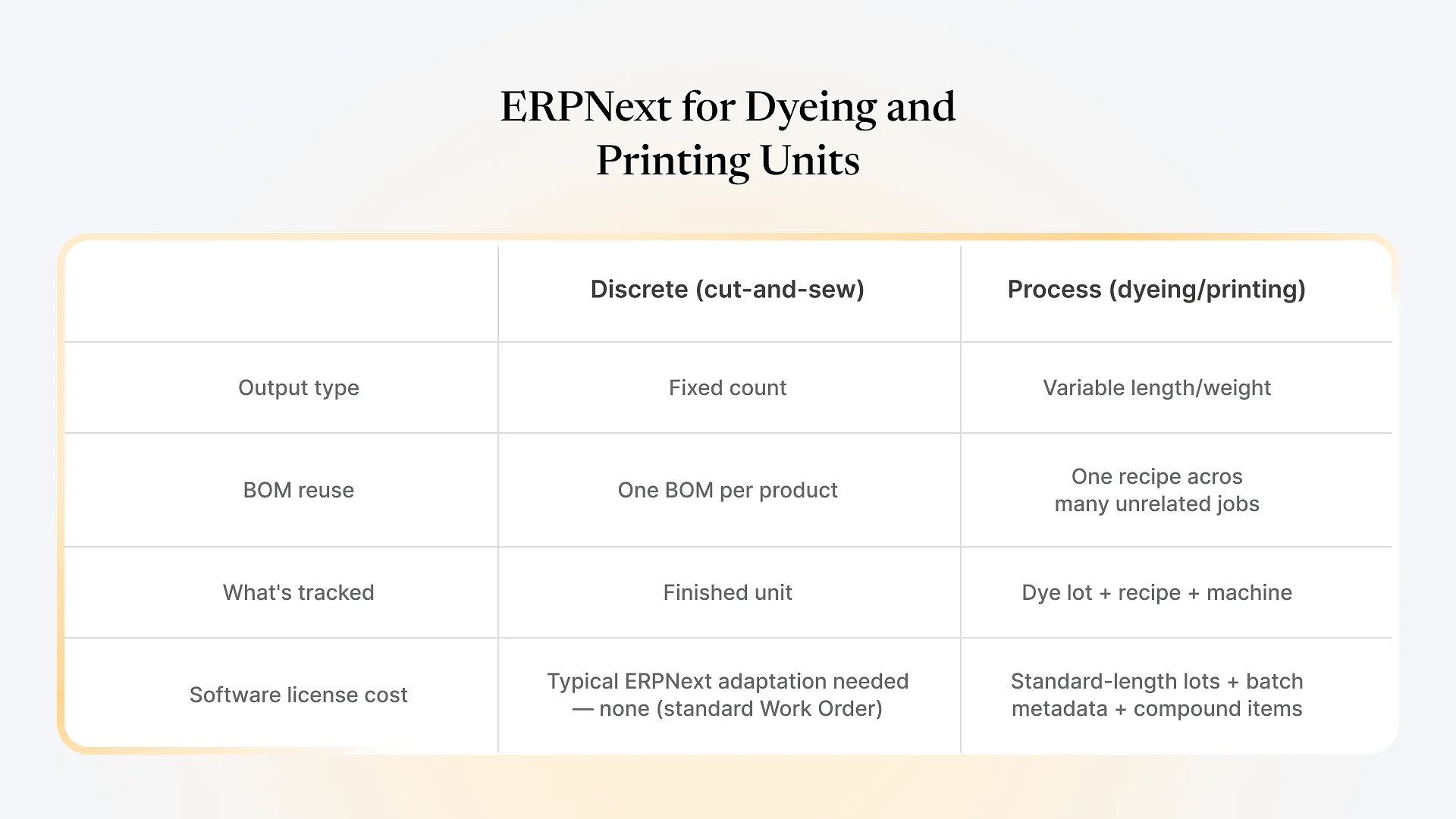
Dyeing and printing units don’t manufacture the way ERPNext’s default Work Order model expects. A stitching unit turns fabric into a fixed number of garments per order — one input, one countable output. A dyeing or printing unit takes in a running length of greige fabric and puts out a continuous, variable-length roll, often against a recipe reused across dozens of unrelated jobs. That mismatch is the real question behind “ERPNext for dyeing and printing units” — not whether ERPNext can do it, but how much setup judgment it takes to make process manufacturing behave sensibly inside a system built around discrete units.
ERPNext can run a dyeing or printing unit, but not out of the box. It takes deliberate setup: standard-length production lots instead of literal continuous tracking, Batch records that carry dye-lot and recipe metadata, and often a compound item pattern for print jobs bundling fabric, design, and process together. Get these choices wrong at setup, and the system spends years fighting your floor process instead of supporting it.
What ERPNext for Dyeing and Printing Units Actually Requires
A dyeing batch might start with roughly 1,000 meters of greige fabric and finish somewhat lighter after normal shrinkage, or a printing run's usable output depends on how much fabric clears quality checks after the print. A Work Order expecting an exact planned-vs-actual match forces someone to either fudge the numbers or spend time reconciling variance that's completely normal for the process.
A single dye shade or print design gets reused across fabric from different customers, different fiber content, and different lot sizes, often on the same machine run. Modeling every combination as its own BOM is unmanageable.
In printing especially, the tracked item isn't just fabric — it's fabric plus a specific design, which changes the BOM, the machine setup, and sometimes the finishing steps, on nearly every job.
How the Adaptation Actually Works
Standard-length lots instead of literal continuous output
Most implementations settle on a fixed production-lot size — say 1,000 meters — as the unit a Work Order tracks, even though the physical process is continuous. Output above or below that figure gets logged as normal process variance rather than an exception. This one decision usually determines whether floor staff actually use the system or quietly route around it.
Batch records carrying process metadata, not just a lot number
Instead of treating a Batch ID as a bare tracking number, it's set up to carry the dye-lot number, the recipe or shade code, and the machine used, so a customer complaint about shade variation can be traced back to the exact recipe and equipment in minutes rather than through paper logs. This is where ERPNext's batch tracking earns its keep for a process operation: the value isn't in tracking quantity, it's in tracking what was done to produce that quantity.
Compound items for print jobs
Where every print job effectively creates a new "product" — this fabric, with this design, via this process — a cleaner pattern than building a new BOM per job is defining a compound item that bundles fabric, design, and process together, with the BOM generated on the fly from that combination. Done well, this keeps Work Orders and stock movements fully standard; the customization lives in how the item is defined, which matters when the person who built the customization eventually leaves.
Traceability, Quality, and Why It Matters More Here
Wet processing carries a compliance and dispute exposure that most discrete manufacturing doesn’t: shade variation between lots, dye-fastness failures showing up after a garment ships, or a customer disputing which recipe was actually used. When Batch metadata is set up properly from the start — dye lot, recipe code, machine, operator, and timestamp all attached to the batch record — that dispute becomes a five-minute lookup instead of a week chasing paper logs and machine logbooks. Retrofitting this after go-live is far more disruptive than deciding the Batch structure before the first production run, because every batch created before the fix carries incomplete history. This is also a common pattern in the failed or stalled rollouts we get brought in to fix: the batch structure was designed around discrete manufacturing from a generic template and retrofitted for process data only after the gaps became painful.
This is also where rejection and quality-control data earns its value: linking rejected output back to the specific batch and recipe, rather than logging “this order had defects,” is what turns a quality log into something that actually improves the next run.
If your unit is still weighing whether ERPNext is worth this setup effort against a lighter point solution, that’s worth working through with someone who’s configured this specific process before rather than guessing at the tradeoffs alone.
What This Looks Like in Practice
Consider a mid-sized dyeing unit processing fabric for three or four garment exporters, each with their own shade cards and lot-size expectations — a common profile for this kind of setup. The standard-length lot convention absorbs the natural variance between exporters’ batch sizes. Batch metadata carrying dye recipe and machine assignment means a shade-match dispute from one exporter doesn’t require pulling paper logs; it’s a lookup. And because the compound-item pattern keeps Work Orders standard, the unit isn’t locked into custom code that only the original implementer understands.
We’ve set up ERPNext for textile operations spanning fabric production, dyeing, and finishing stages end to end — the case study on ERPNext for textile manufacturing and supply chain management covers a similar multi-stage process environment in more depth.
Frequently Asked Questions
Where to Go From Here
If dyeing or printing is one stage in a longer production chain — spinning through finishing, or fabric through garment — the setup questions above compound with each added stage. Getting the batch and lot structure right at the dyeing/printing stage matters even more when downstream stages depend on that data being accurate. Book a free ERPNext consultation and we’ll look at your actual process flow before recommending a configuration.