A Bill of Materials (BOM) is the record that tells ERPNext — and everyone on your shop floor — exactly what raw materials, sub-assemblies, and operations go into producing one unit of a finished item. BOM management in ERPNext means keeping that record accurate as products, suppliers, and costs change, so every Work Order, purchase requisition, and cost calculation downstream is built on numbers that actually match production.
In short: BOM management in ERPNext is the process of creating, versioning, and maintaining the item-and-operation structure behind each product you manufacture — using ERPNext’s multi-level BOM, BOM Browser, and cost roll-up tools to keep production, purchasing, and costing aligned as things change. For manufacturing SMEs, getting this right matters more than most other setup decisions, because a wrong or outdated BOM doesn’t just cause a data error — it triggers wrong material requirements, wrong costs, and wrong purchase orders.
What BOM Management in ERPNext Actually Involves
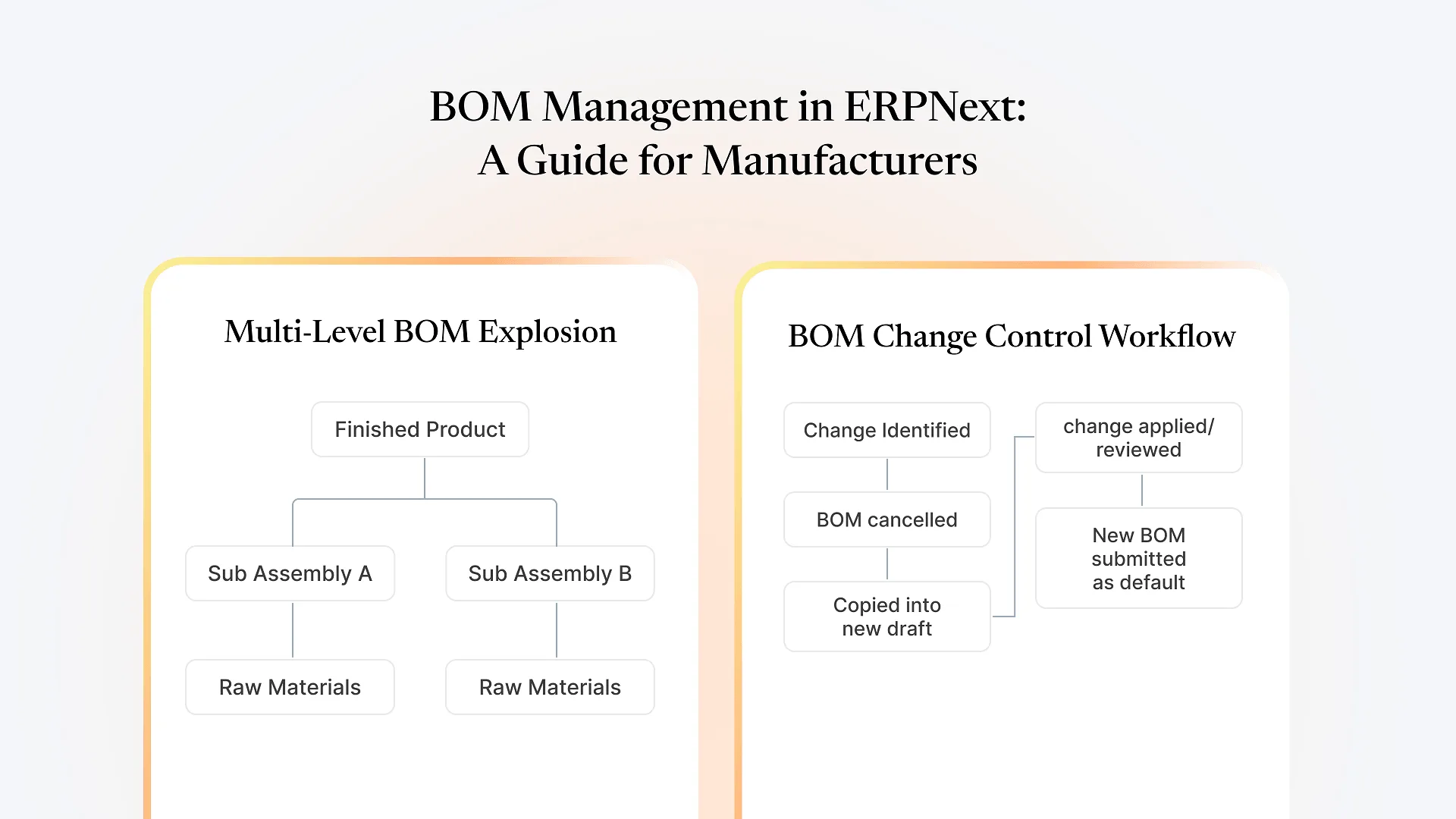
ERPNext supports BOMs with or without manufacturing operations, and single-level or multi-level structures. A single-level BOM lists the raw materials that go directly into a finished item. A multi-level BOM goes further: if one of those “raw materials” is actually a sub-assembly you manufacture in-house, that sub-assembly gets its own BOM, and ERPNext explodes the full tree — sub-assembly components, their components, and so on — when calculating total material requirement or cost.
BOMs in ERPNext are submittable documents, not freely editable ones. Once a BOM is submitted and used in production, you can’t just edit it — you cancel it, copy it into a new draft, make your change, and submit the new version. This is deliberate: it keeps a full audit trail of what a product’s structure looked like at any point in time, which matters when you’re investigating a costing discrepancy or a quality issue traced back to a specific production run.
The BOM Browser is the tool for navigating this in practice — it lets you drill through multi-level structures, see which BOM is marked “is default” for an item, and check where a sub-assembly is used across other BOMs before you change it.
Where BOM Accuracy Breaks Down in Growing Manufacturing Businesses
The BOM structure itself is rarely the hard part. What we see repeatedly with manufacturing SMEs is the engineering BOM — what design or product intended — drifting apart from the manufacturing BOM actually being used on the floor. A substitution gets made during a material shortage, operators adjust a process without it being logged back, or a new supplier’s packaging changes a unit-of-measure conversion, and none of it gets reflected in the ERPNext BOM. Production keeps running on the old numbers.
This shows up months later as a costing report that doesn’t match reality, or a material shortage nobody predicted because the BOM ERPNext used to calculate requirement wasn’t the BOM the floor was actually following. Fixing it after the fact takes far longer than maintaining the discipline would have.
How ERPNext Structures BOM Management to Reduce This Risk
only one BOM per item can be marked "is default," so Work Orders and Material Requests always pull from a single source of truth instead of an ambiguous list of versions.
ERPNext recalculates an item's manufacturing cost based on the current valuation of its BOM components, so a raw material price change flows through to finished-goods costing without a manual recalculation.
a BOM can include the manufacturing operations required (and their time/cost), not just materials, so labor and machine time are part of the same costing picture rather than tracked separately.
BOM lines support a scrap percentage and unit-of-measure conversion factors, which is where a lot of manually maintained spreadsheets quietly go wrong.
None of this replaces the discipline of updating a BOM when something changes on the floor — it just makes doing so fast enough that people actually do it.
If you’re still deciding whether ERPNext’s manufacturing tools fit how your production actually runs, a free ERPNext consultation is a reasonable next step before you commit to restructuring your BOMs around it.
BOM Management and Material Traceability
BOM structure and batch traceability are two sides of the same problem: knowing exactly what went into a finished unit. A BOM tells you what should have gone in; batch and expiry tracking on the raw material side tells you what actually did, down to the specific lot. For manufacturers working with perishable or regulated inputs, connecting the two is what makes a recall or quality investigation a lookup instead of a guessing exercise — we cover how that batch-level tracking works in more depth in batch and expiry tracking for FMCG manufacturers, which applies directly if your BOM includes any batch-controlled raw materials.
Setting Up BOM Management That Holds Up in Practice
Every time you create a revised BOM, deliberately decide whether it should replace the active one — don't let an old version stay live by accident.
If a shortage forces a material swap, submit it as a proper revision rather than letting the shop floor deviate from what ERPNext has on file.
A scrap factor set once at implementation and never revisited tends to drift from what production actually experiences.
The BOM Browser will show you every parent BOM affected — check it before editing a component that feeds multiple products.
Someone specific — not "whoever has time" — should own keeping BOMs current when engineering or purchasing changes something.
Common Mistakes in ERPNext BOM Management
Leaving multiple BOMs marked active for the same item,
which creates ambiguity about which one a Work Order will actually pull.
Ignoring the scrap percentage field
and absorbing material variance as an unexplained cost overrun instead.
Skipping the cancel-copy-resubmit process
by trying to force an edit into a submitted BOM, which ERPNext won't allow and which signals the change wasn't actually reviewed.
Not checking downstream usage
before altering a sub-assembly BOM that's shared across several finished products.
Treating BOM setup as a one-time task
rather than an ongoing part of production and purchasing operations.