If you send raw material to an outside vendor for processing — dyeing, machining, plating, printing, assembly — and get finished or semi-finished goods back, you’re doing job work, and tracking it in a spreadsheet stops working the moment you have more than two or three subcontractors running at once. Job work management ERP capability means the system can track material issued to a subcontractor, monitor what’s still with them, and reconcile finished goods received against what was sent — without you re-keying it into Excel or chasing challans by phone. In ERPNext, this runs through the Subcontracting module: Subcontracting Orders, material transfer, and Subcontracting Receipts, tied to a BOM for each subcontracted item.
That’s the mechanism. The part most guides skip is what actually goes wrong once you put it into daily use.
Why Job Work Management ERP Matters More Than the Feature List Suggests
Job work is a specific, common pattern in Indian manufacturing, and it shows up under GST as its own defined activity, with its own challan format (Form GST ITC-04) and its own compliance obligations around how long material can stay outside your factory before it needs to come back or get formally billed. A lot of ERP subcontracting documentation — ERPNext’s included — explains the module mechanically: create a Subcontracting Order, transfer materials, receive the output. What it doesn’t cover is that in practice, job work and “subcontracting” aren’t always the same thing, and conflating them is where SME setups go wrong.
Subcontracting, as ERPNext models it, assumes you supply raw material and a BOM, and the vendor returns a finished or semi-finished item, valued at raw material cost plus a service charge you pay them. Job work under GST is broader: it can include your own goods going out for repair, reconditioning, or partial processing where no new BOM-based item is really being “manufactured” in the ERP sense. Where the two overlap, ERPNext’s Subcontracting Order and Receipt flow fits well. Where they don’t — a straightforward repair job, for instance — forcing it through the subcontracting module because “that’s the job work feature” usually creates more reconciliation work than it saves.
How the Core Workflow Actually Runs
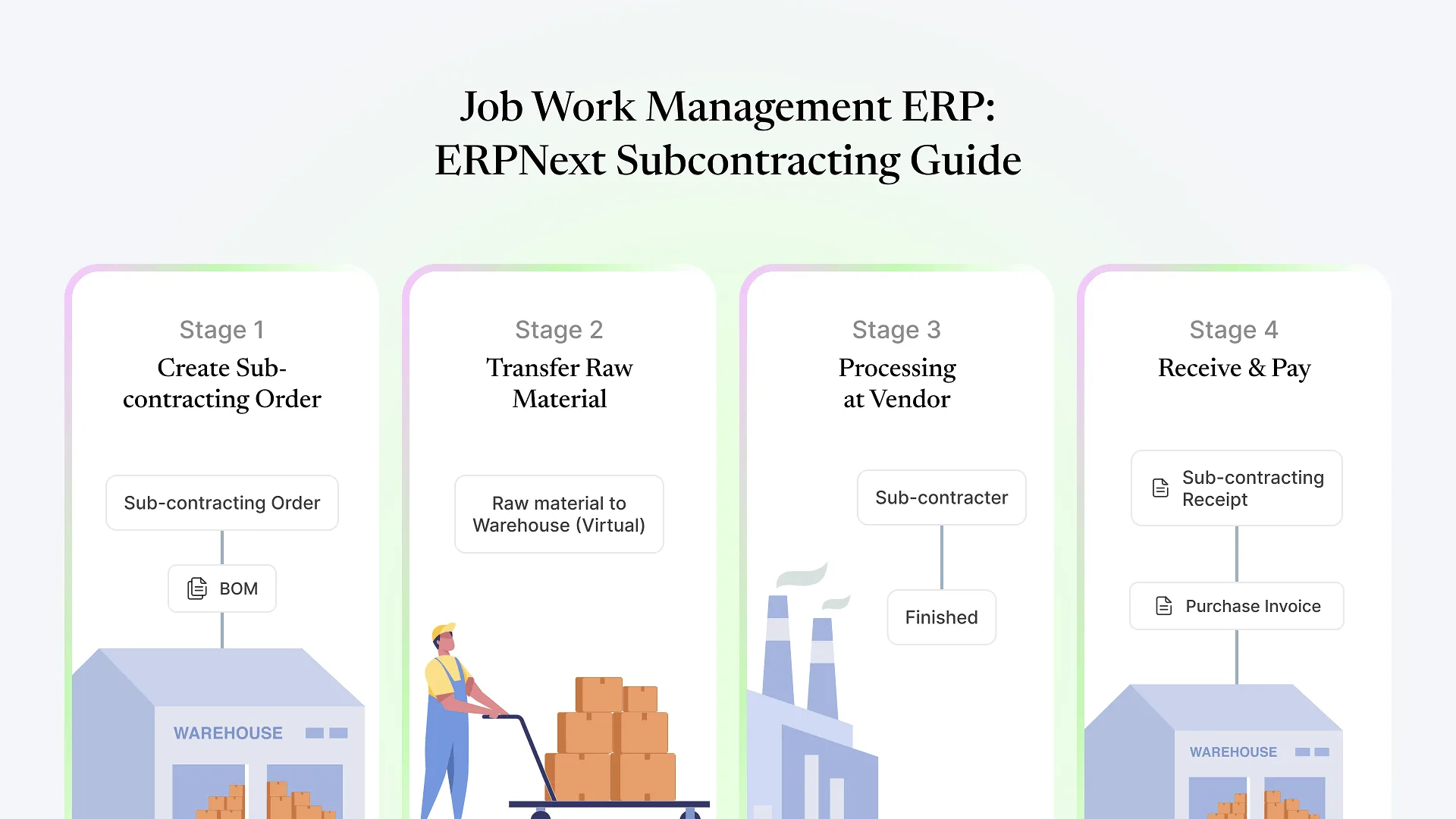
Subcontracting Order is raised against the subcontractor, naming the finished item and its BOM. This is where ERPNext knows which raw materials need to go out.
Raw materials are transferred to the subcontractor's warehouse — a virtual warehouse inside ERPNext representing stock that's physically at the vendor's site but still on your books. This transfer is what generates the paperwork equivalent of a job work challan.
The subcontractor does the work and you record a Subcontracting Receipt when the finished or semi-finished goods come back, which consumes the transferred raw material against the BOM and books the vendor's service charge.
A Purchase Invoice and you record a Subcontracting Receipt when the finished or semi-finished goods come back, which consumes the transferred raw material against the BOM and books the vendor's service charge.
Job Work Inward: When You're the Subcontractor
Some manufacturers do both — they send certain processes out, and they also take in job work from other companies as a revenue line. ERPNext handles this direction too, generally under what’s referred to as Subcontracting Inward: a customer supplies materials to you, you perform the processing or manufacturing, and you bill for the service.
This matters for SMEs specifically because the two flows use different logic and different reporting. If your ops team only sets up outward subcontracting and later starts taking in job work from a client without configuring the inward side properly, the customer-supplied material tends to get recorded as your own purchased stock by default, which overstates your inventory and misrepresents ownership if that material needs to be tracked separately for the client’s own GST filings.
Not sure whether your current setup handles both directions correctly, or only one? A quick review usually catches it early — happy to take a look if you’d rather have a second set of eyes than find out at year-end stock reconciliation.
Where Job Work Setups Usually Break Down
Treating the subcontractor warehouse as an afterthought
If it isn't tracked with the same discipline as your own warehouses — regular reconciliation, someone accountable for what's showing as "out" — it silently accumulates discrepancies that only surface at audit or stock-take time, usually as a number nobody can explain.
No process for aging material at the subcontractor
ERPNext will show you what's currently transferred out, but it won't flag on its own that a batch has been sitting with a vendor for four months when your job work terms assume a two-week turnaround. That needs a manual review cadence or a report someone actually checks, not just a dashboard nobody opens.
Mixing job work challans with regular purchase documentation
Job work movements have distinct GST treatment from a normal purchase. Teams that process them through the same document types and don't distinguish the two end up doing manual GST return reconciliation that the ERP was supposed to eliminate.
Underestimating how this interacts with multi-location structures
If your subcontractors serve more than one of your plants, or your own warehouse structure spans multiple companies, the subcontractor-warehouse setup needs to align with that structure from the start — we've covered how ERPNext's company and warehouse hierarchy works more broadly, and the same warehouse-boundary logic applies to where subcontractor stock sits.
Frequently Asked Questions
Getting Job Work Right Before It Becomes a Reconciliation Problem
Job work tracking rarely breaks all at once. It erodes gradually — a challan that didn’t get entered, a return quantity that didn’t quite match, a subcontractor warehouse nobody’s reconciled since the last audit — until someone spends a week trying to explain a stock variance that a properly configured flow would have caught in real time. If you’re evaluating whether your ERPNext setup actually reflects how your job work runs, or you’re setting this up for the first time, book a free ERPNext consultation and we’ll walk through your actual subcontracting flow rather than a generic template.