




If you’re evaluating the ERPNext quality management module, you probably want to know one thing: can it replace the inspection register, the Excel QC sheets with tolerance limits, and the folder of paper NCRs your team runs today? Mostly yes, with a few predictable gaps.
The ERPNext quality management module works in two layers: Quality Inspections attached to purchase receipts, manufacturing and deliveries, driven by templates that define parameters and acceptance limits; and a quality management system layer covering Quality Procedures, Goals, Reviews, Actions and Non Conformance records for tracking deviations and corrective action.
This guide walks through both layers from a QA/QC manager’s point of view and is direct about where the standard module stops. Field and setting names below reflect recent ERPNext versions; older installations may label them slightly differently.
What the ERPNext Quality Management Module Covers
Quality in ERPNext is easiest to understand as two connected pieces rather than one module.
The inspection layer sits inside stock and manufacturing. A Quality Inspection records readings against a set of parameters for a specific item, batch and transaction. It can be required before goods are received, during production, or before goods are delivered.
The quality management system (QMS) layer sits in the Quality module itself. It holds the documents an ISO-style system expects: procedures, quality goals, periodic reviews, feedback, meetings, corrective and preventive actions, and non-conformance records.
Most teams start with the inspection layer because it touches daily work. The QMS layer earns its place once you want audits and reviews to live in the same system as the transactions they refer to.
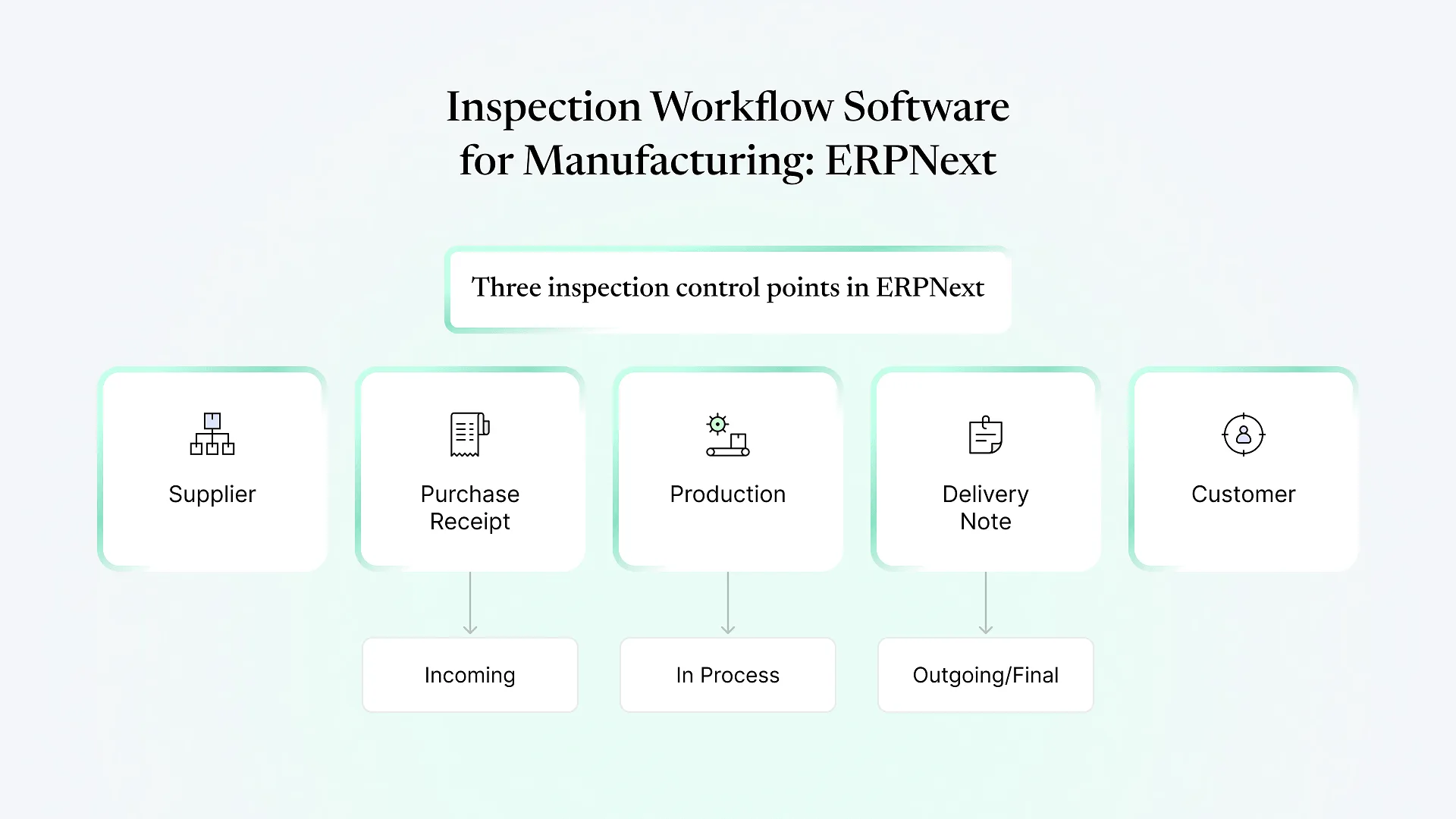
QC Checkpoints in ERPNext: Incoming, In-Process and Outgoing
Mark an item "Inspection Required before Purchase" on the item master, and ERPNext expects a Quality Inspection against the Purchase Receipt (or the Purchase Invoice, if stock is received through it). The inspector records a reading for each parameter, and the inspection is marked Accepted or Rejected.The Purchase Receipt separates received, accepted and rejected quantities, and rejected quantity can be routed to a dedicated rejected warehouse. Rejected material stays visible in stock but outside the usable pool, so stores can't accidentally issue it to production while a supplier return is being arranged.
For manufactured items, inspection can be required on the BOM. Depending on how you run production, the inspection is linked either to the Stock Entry that records manufacture or to a Job Card for a specific operation.Job Card linkage is the closer match to a real in-process checkpoint. It ties the readings to an operation and workstation rather than to the finished batch as a whole. If your process has one operation where defects are born (a heat treatment, a stitching stage, a filling line), that's where the check belongs.
"Inspection Required before Delivery" on the item master does the same job on the sales side. A Quality Inspection is expected against the Delivery Note or Sales Invoice before goods leave.If you ship to customers who run their own incoming QC, a submitted outgoing inspection gives you a dated record with readings to point to when a complaint arrives weeks later.
Inspection Templates, Parameters and Acceptance Criteria
Typing parameters into every inspection would defeat the point. ERPNext uses a Quality Inspection Template: a list of parameters linked from the item master or BOM, so the right checklist loads automatically when an inspection is created.
Each parameter can be checked in one of three ways:
| Reading type | How acceptance works | Typical use |
|---|---|---|
| Numeric | Reading must fall between a minimum and maximum value | Dimensions, GSM, weight, pH, moisture |
| Non-numeric | Reading must match an expected value | Shade match, visual defects, pass/fail checks |
| Formula-based | A condition evaluated against the recorded readings | Derived checks, such as an average across samples |
Several readings can be recorded per parameter, which suits lot sampling where an inspector measures multiple pieces. With acceptance criteria defined, each parameter’s status is evaluated against the limits instead of relying only on the inspector’s call.
Parameters are master records and can be grouped, so a “Fabric” or “Packaging” parameter group is defined once and reused across templates.
Making Inspections Mandatory : Stop vs Warn
Action if Quality Inspection is not submitted: Stop or Warn
Action if Quality Inspection is rejected: Stop or Warn
“Stop” blocks the Purchase Receipt, Stock Entry or Delivery Note from being submitted. “Warn” lets it through with a message. Many plants run on Warn during go-live and switch to Stop once inspectors are entering data reliably, because a hard block on day one tends to stall the receiving bay.
These are company-wide settings. You can’t be strict for critical raw materials and relaxed for consumables through this setting alone; the usual answer is to require inspection only on the items that matter, or add a small customization.
The QMS Layer: Procedures, Goals, Reviews and Actions
Quality Procedure
documented processes, structured as a tree so sub-procedures sit under a parent.
Quality Goal
measurable objectives with a monitoring frequency, such as reducing supplier rejections.
Quality Review
periodic reviews against goals, recording whether each objective was met.
Quality Feedback
structured feedback from customers or internal users, built from templates.
Quality Meeting
agendas and minutes for quality review meetings.
Quality Action
corrective or preventive actions raised from a review, feedback or non-conformance, with resolution steps.
Non-Conformance Tracking in ERPNext
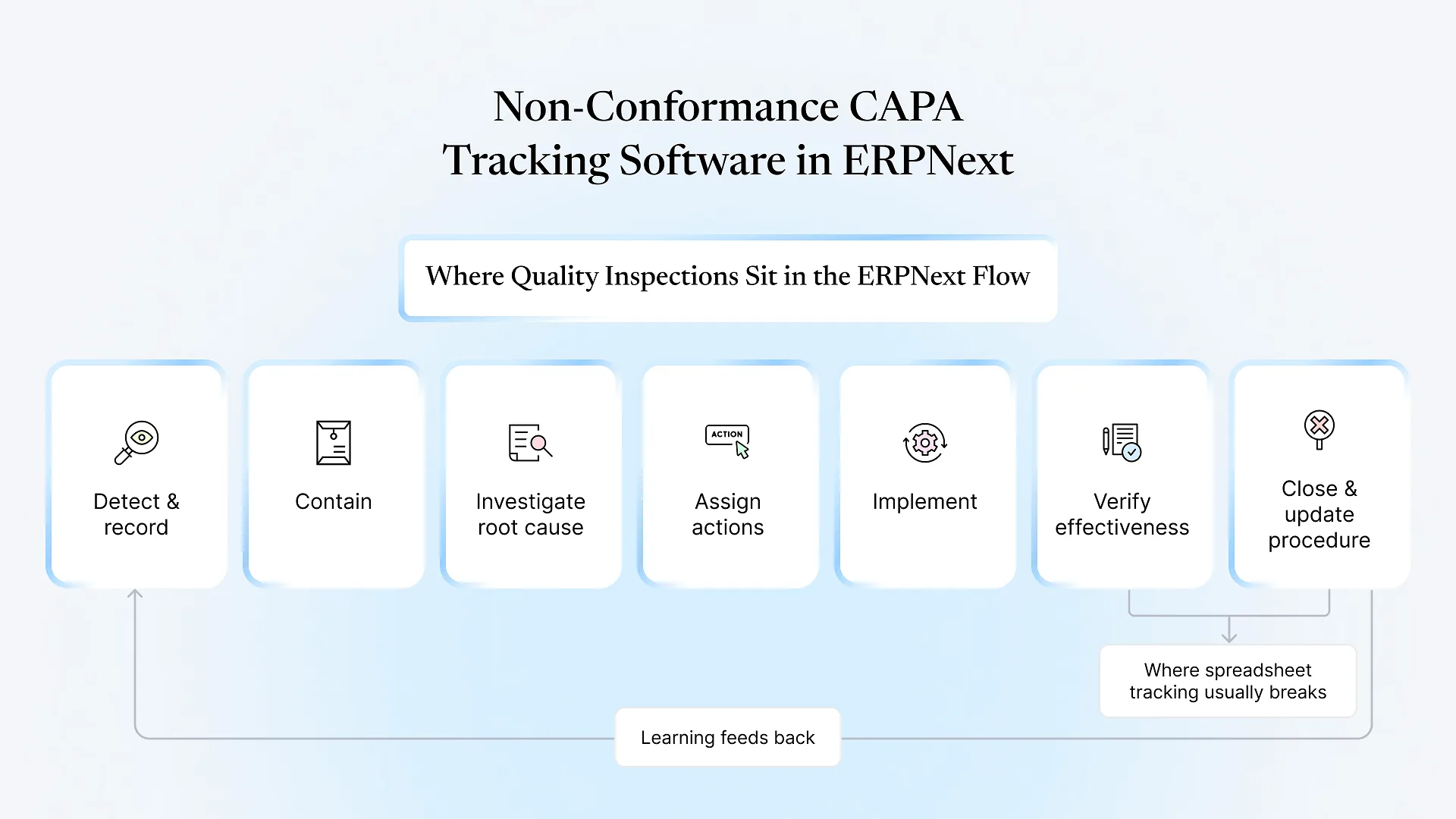
A Non Conformance record logs an observation that a specific Quality Procedure wasn’t followed. It captures the procedure, the process owner, what happened, and the corrective and preventive actions, with a status of Open, Resolved or Cancelled.
That’s useful, but it’s lighter than the NCR many plants fill in on paper. The standard form doesn’t natively carry:
A link to the specific rejected Quality Inspection, batch or supplier
Severity or defect classification
A disposition decision (scrap, rework, return to vendor, use as-is)
The cost of the non-conformance
Where the Standard Module Stops
Sampling plans aren't automated
Sample size is entered on the inspection; there's no built-in AQL table that derives sample size from lot size.
No statistical process control
Readings are stored, but there are no native control charts or Cp/Cpk calculations. Those need reports or a dashboard.
Calibration isn't a dedicated feature
Gauge and instrument calibration is usually handled through asset maintenance or a custom doctype.
NCR linkage is manual
as covered above.
None of these are unusual requests, and each is a contained piece of ERPNext customization rather than a reason to run QC outside the ERP. Aavatto has worked hands-on with Frappe and ERPNext since 2020, including taking over implementations where quality was left as an afterthought.
If you’re unsure which of these gaps actually matter for your plant, that’s a quick thing to talk through before anyone starts configuring.
A Practical Setup Checklist for QA/QC Managers
List your checkpoints
Which items genuinely need incoming, in-process or outgoing inspection? Inspecting everything slows receiving without improving quality.
Convert QC sheets into templates
Each existing Excel QC sheet usually becomes one Quality Inspection Template.
Define parameters and limits
Decide which are numeric, which are visual, and whether any need formulas.
Set up a rejected warehouse
Agree how rejected stock is held, returned or reworked.
Decide Stop or Warn
Set a date or condition for moving from Warn to Stop.
Map your NCR form
Compare it with the standard Non Conformance form and list the missing fields.
Agree on reports
Decide which rejection and supplier reports the quality team needs each week.
This is where a tailored ERPNext implementation pays off. Configuration is quick when these decisions are made upfront and slow when they’re made during go-live.