



A supplier ships a batch of brackets with the wrong hole spacing. Incoming inspection catches it, someone writes it up, the batch goes back. Three months later the same defect turns up again, and nobody can find what was decided last time. That is the problem non-conformance and CAPA tracking exists to solve.
What is non conformance CAPA tracking software? It is a system that records every quality deviation (a non-conformance), links it to the product, process or supplier involved, assigns corrective and preventive actions to named owners with due dates, and keeps evidence that each action was completed and checked. The goal is a closed loop: every problem is investigated, fixed and verified so it does not return.
Most CAPA software for manufacturing that you will find is a standalone quality management system. This guide looks at a different option: running non-conformance and CAPA tracking inside ERPNext, where your receipts, job cards and deliveries already live. It covers what ERPNext does out of the box, where it stops, and how to configure the rest.
Non-Conformance vs CAPA: Two Records, One Loop
the event. Something did not meet a requirement: a material failed inspection, a process drifted out of spec, a customer complained, an internal audit found a gap.
what you do to remove the cause of a non-conformance that has already happened.
what you do to stop a potential problem from happening at all, or to stop a fixed problem appearing somewhere similar.
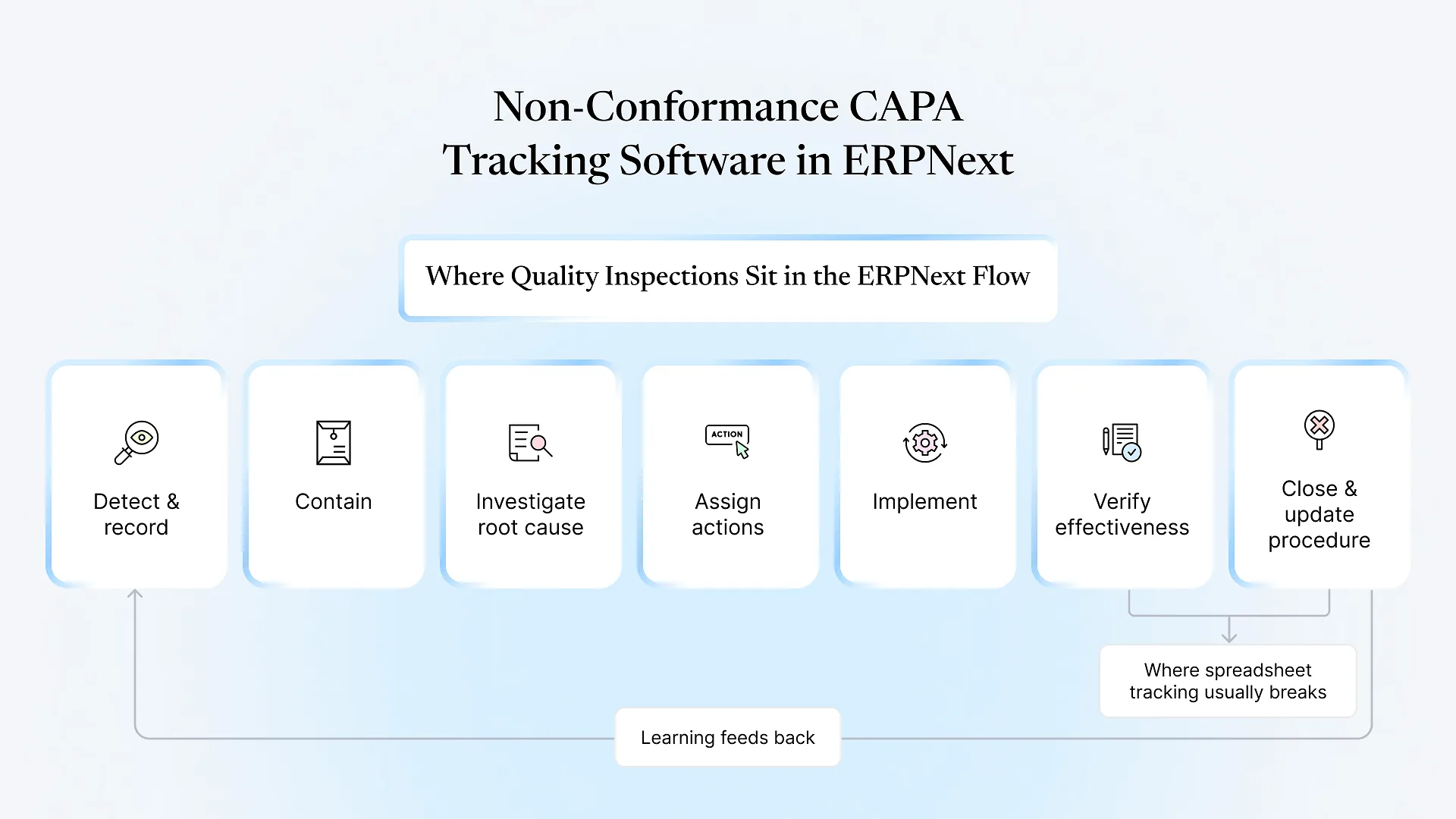
The closed-loop lifecycle
Detect and record the non-conformance, with the item, batch, supplier or operation involved.
Contain the immediate problem: quarantine stock, hold a shipment, stop a line.
Investigate root cause (5-Why, fishbone, or whatever method your team uses).
Assign actions with an owner and a due date.
Implement the actions.
Verify effectiveness: did the fix actually hold over the following batches?
Close with evidence, and feed the learning back into procedures.
What ERPNext Gives You Out of the Box
| ERPNext document | Role in a CAPA process |
|---|---|
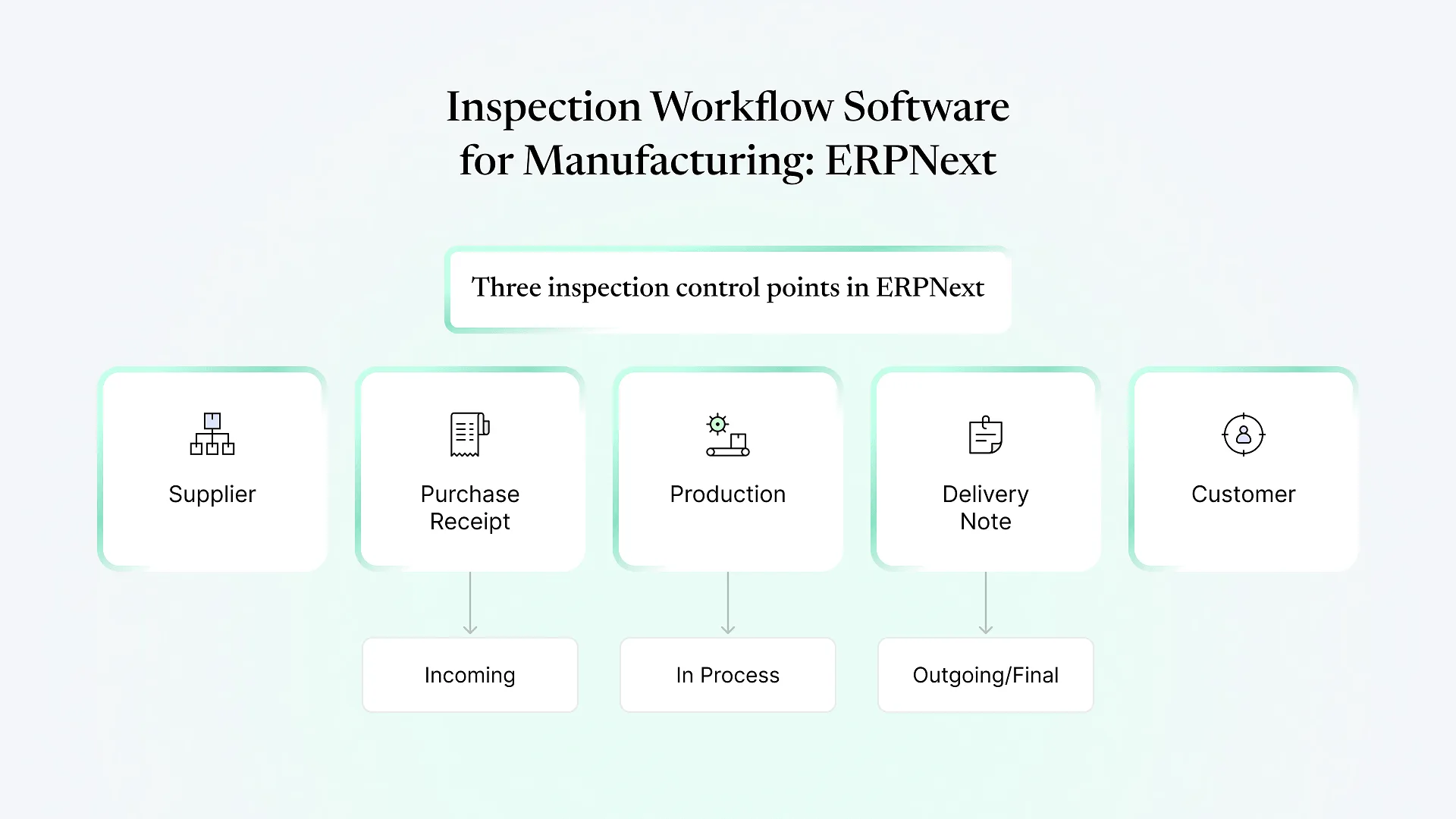
| Quality Inspection | Records readings against a template of parameters and acceptance criteria. Can be raised against Purchase Receipts, Delivery Notes, Stock Entries and Job Cards (exact options depend on version), and marked Accepted or Rejected. |
| Non Conformance | Logs the deviation itself: subject, related quality procedure, process owner, details, and the corrective and preventive action taken. Carries an open/resolved/cancelled status. |
| Quality Action | A tracked action, typed as Corrective or Preventive, with a table of individual problems, resolutions, responsible people and completion status. Can link to a Quality Review or Quality Feedback. |
| Quality Procedure | Your documented process, organised as a tree. NCs and actions point back to the procedure they relate to. |
| Quality Goal / Quality Review | Measurable objectives and periodic reviews against them, which give preventive actions a place to originate. |
| Quality Meeting | Agenda and minutes for management review, linked to the records above. |
Field names shift slightly between ERPNext versions, so check your own instance, but the structure has been stable for several releases.
The important point is not that these documents exist. It is that they sit in the same database as your stock ledger, production records and supplier master. A rejected Quality Inspection on a Purchase Receipt already knows the supplier, item, batch and warehouse. In a standalone tool, someone retypes all of that, and the retyping is where errors and delays creep in.
Where Stock ERPNext Stops
No automatic hand-off from inspection to NC
A rejected Quality Inspection does not create a Non Conformance by itself. Someone has to raise it, or you add a small automation.
Root cause analysis is free text
There is no built-in 5-Why or fishbone structure. If auditors expect structured RCA, it has to be added.
No effectiveness-check step by default
A Quality Action can be marked complete without a separate verification step or verifier.
Limited severity and disposition fields
Stock NCs do not ask for severity, or for a disposition such as scrap, rework, return to supplier or use-as-is.
Supplier performance is not rolled up
The data to calculate rejections per supplier is there, but no ready-made report ties NCs to supplier scorecards.
Each of these is usually closed with custom fields, a workflow and a small script, not with a rebuild. That is the normal gap between a general-purpose module and a quality system shaped to your plant.
If your inspections already run in ERPNext, this is usually a configuration conversation rather than a new software purchase.
Setting Up CAPA Tracking in ERPNext: A Practical Configuration
Turn on inspection requirements at the item level for incoming materials and finished goods that carry real risk. ERPNext will then expect a Quality Inspection before the transaction is submitted, so rejections are recorded in the system instead of on paper.
Add a button or server-side rule so that a Rejected Quality Inspection creates a draft Non Conformance with the item, batch, supplier and reference document already filled in. The inspector adds the description; nothing gets retyped.
Typical custom fields on Non Conformance:
Severity (minor, major, critical)
Source (incoming, in-process, final, customer complaint, internal audit)
Disposition (scrap, rework, return to supplier, use-as-is with concession)
Containment action and date
Root cause method and findings
Use ERPNext's Workflow feature to add states such as Open, In Progress, Pending Verification and Closed, with a rule that the person verifying effectiveness is not the person who did the work. Add a verification date so the check happens a few batches later, not the same afternoon.
Open NCs by age and severity
Overdue actions by owner
Repeat NCs by item, supplier or operation
Supplier rejection trend
Once the fields exist, these are standard Report Builder or script-report work.
This is the kind of extension covered by ERPNext customization: adding fields, workflows and small automations on top of standard doctypes without forking the core, so upgrades stay manageable.
Non-Conformance CAPA Tracking Software: ERP-Native vs Standalone eQMS
| Consideration | CAPA inside ERPNext | Standalone eQMS |
|---|---|---|
| Link to stock, batches, suppliers, production | Native, no re-entry | Needs an integration or manual entry |
| Regulated validation (electronic signatures, validated systems for pharma or medical devices) | Achievable, but needs deliberate configuration and validation effort | Often designed with this in mind |
| Document control with formal training records | Basic; usually extended | Typically a core feature |
| Licensing | Part of the open-source ERP, no separate module licence | Usually a per-user subscription |
| Fit for manufacturers already running ERPNext | Strong | Adds a second system to maintain and reconcile |
Getting It Running Without Disrupting the Floor
Start with one source
Incoming inspection is usually the easiest place to begin, because volume is manageable and the supplier link is immediate.
Migrate open items only
Bring open NCs and actions into ERPNext; leave closed history in the old register as a reference rather than cleaning years of spreadsheets.
Agree definitions first
Teams often disagree on what counts as major versus minor. Settle that before you build the severity field.
Keep the form short
Inspectors on the floor will skip a 20-field form. Make most fields optional at draft and required at closure.
If you are setting up quality as part of a wider rollout, it belongs in the scope of a tailored ERPNext implementation rather than being bolted on afterwards.
Frequently Asked Questions
Next Step
If your NCs live in a spreadsheet and your inspections live somewhere else, the fix is often closer than a new system. Aavatto has worked only on Frappe and ERPNext since 2020, for manufacturers across India and the Middle East, including reviewing setups where the Quality module was installed but never wired into daily work.
Book a free ERPNext consultation and we will map your current NC and CAPA process against what ERPNext does out of the box and what would need adding.