



Inspection workflow software for manufacturing links each quality check to the transaction that moves material: receiving raw material, completing a production operation, or dispatching finished goods. Each inspection is recorded against the stock it covers, using a defined template, and the system can block that stock from moving until the inspection is submitted and accepted.
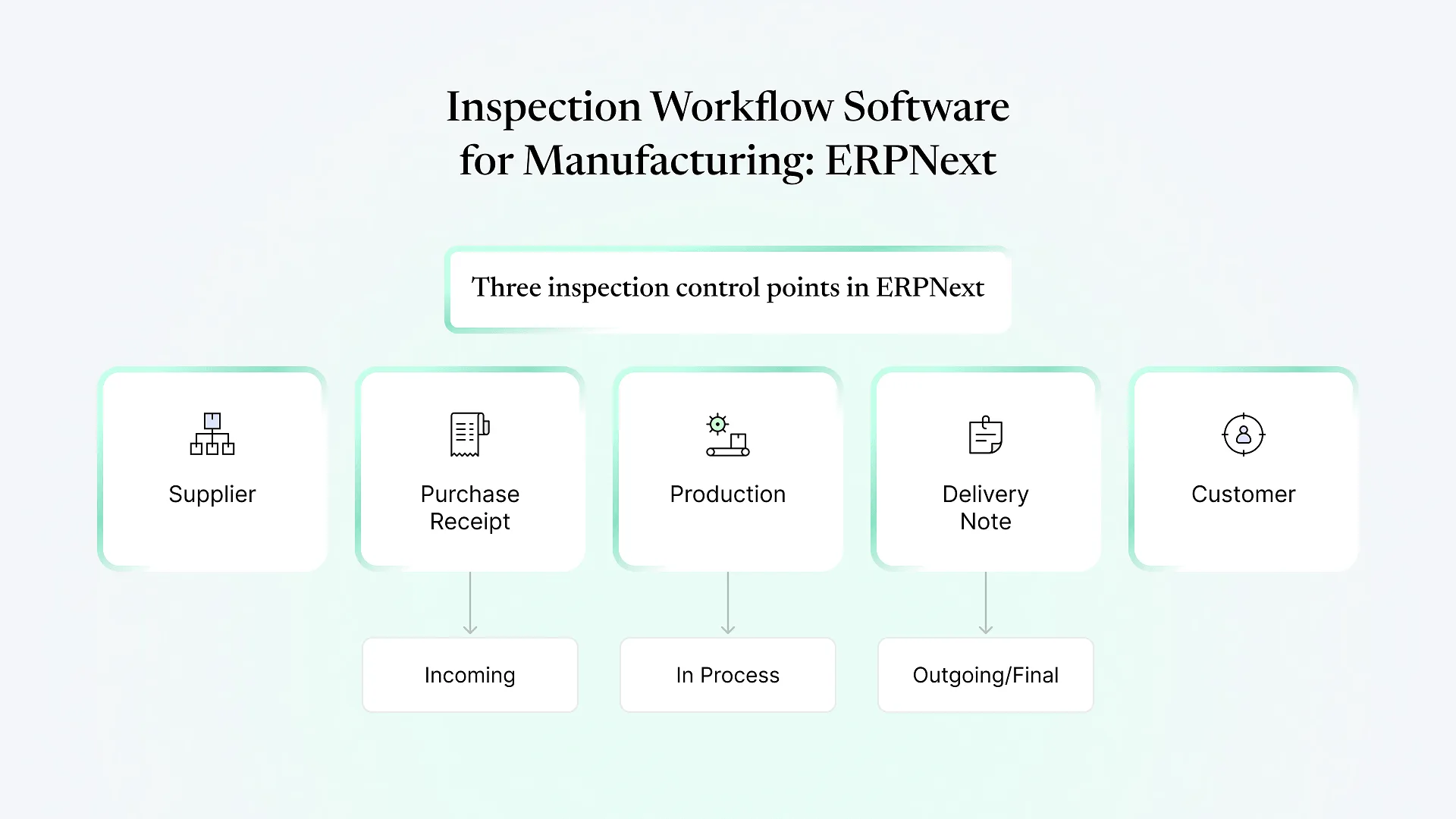
ERPNext handles this with its Quality Inspection document, which supports three inspection types: Incoming, In Process and Outgoing. This guide covers how to set up each stage, the decisions a QA head has to make at each gate, and the mistakes that turn inspections into a formality.
Why inspection workflow software for manufacturing beats a QC spreadsheet
A spreadsheet or paper checklist records that a check happened. It can’t stop a receipt from being posted to stock before the check is done. Because the inspection and the transaction live in different places, they drift apart. Nobody can say with certainty which lot was checked, by whom, or against which version of the spec.
When inspection lives inside the ERP:
Each inspection is linked to a specific Purchase Receipt, Job Card, Stock Entry or Delivery Note.
Batch and serial numbers carry through, so a failed reading can be traced back to a supplier lot.
Rejected quantity can be routed to a separate warehouse instead of sitting in usable stock.
The parameters come from a template, not from whoever happens to be on shift.
The building blocks in ERPNext
These are the individual characteristics you measure, such as thickness, moisture content, colour shade, tensile strength or visual defects. You define each one once and reuse it across templates.
A template groups parameters for an item or operation and sets acceptance criteria. Numeric parameters get a minimum and maximum. Non-numeric parameters get an expected value, such as "No visible damage." Recent versions also support formula-based criteria for cases a simple range can't express.
On the Item master, you can tick "Inspection Required before Purchase" and "Inspection Required before Delivery" and assign a default template. This is what makes inspection mandatory rather than optional.
Incoming inspection: stopping bad material at the gate
Incoming inspection ERP setup starts with the items you buy. Raw materials with a history of lot-to-lot variation are the obvious candidates. Low-risk consumables rarely justify the overhead.
A workable incoming template usually contains:
| Element | What to define |
|---|---|
| Parameters | Only those in your purchase specification or that have caused problems before |
| Acceptance criteria | Min/max for measured values, expected value for visual or pass/fail checks |
| Template scope | One per material family (e.g. "Yarn – Incoming"), not one per item code |
On each relevant Item, tick "Inspection Required before Purchase" and set the template.
When goods arrive, the inspector creates a Quality Inspection of type Incoming against the Purchase Receipt, records the sample size and readings, and submits it.
If Stock Settings are set to stop, the Purchase Receipt can't be submitted until the inspection exists. If it's set to warn, the user sees a message and can continue.
In-process quality control in ERPNext
Operation-level checks on Job Cards
If you run Work Orders with routings, each Job Card can carry a Quality Inspection Template. The operator or line inspector records an In Process inspection against the Job Card before completing it. This suits multi-step processes where a defect introduced at one operation shouldn't travel on to the next.
Checks at the Manufacture Stock Entry
For simpler production, you can require inspection when finished or semi-finished goods are posted to stock through a Manufacture entry. There's less shop-floor data entry, but you only catch problems once the batch is complete.
The real decision is granularity. Inspecting every operation gives the best traceability but adds work to every job. Most plants gate only the operations where a defect is expensive to discover later, such as before an irreversible step like cutting, coating or assembly.
Not sure which operations deserve a gate? Laying your current QC plan against your routing usually shows the gaps quickly. We’re happy to look at it with you as part of a free consultation.
Final inspection before dispatch
Final inspection is the last point to catch a problem before it reaches a customer. Tick “Inspection Required before Delivery” on finished goods and assign an outgoing template. The inspection is then created against the Delivery Note, or a Sales Invoice that updates stock.
Many customers, particularly in export supply chains across India and the Middle East, expect an inspection report or certificate of analysis with each shipment. The submitted Quality Inspection is the record behind that document. A custom print format can produce it directly, so nobody has to retype the data into Word.
Final inspection criteria are often customer-specific. Rather than duplicating a template per customer, some manufacturers keep a base template per item and add customer parameters through configuration or light customization.
Handling rejections and non-conformance
A failed inspection needs somewhere to go. On a Purchase Receipt, ERPNext lets you split accepted and rejected quantity and post the rejected portion to a Rejected Warehouse. Failed material stays visible but out of the stock your planners can allocate.
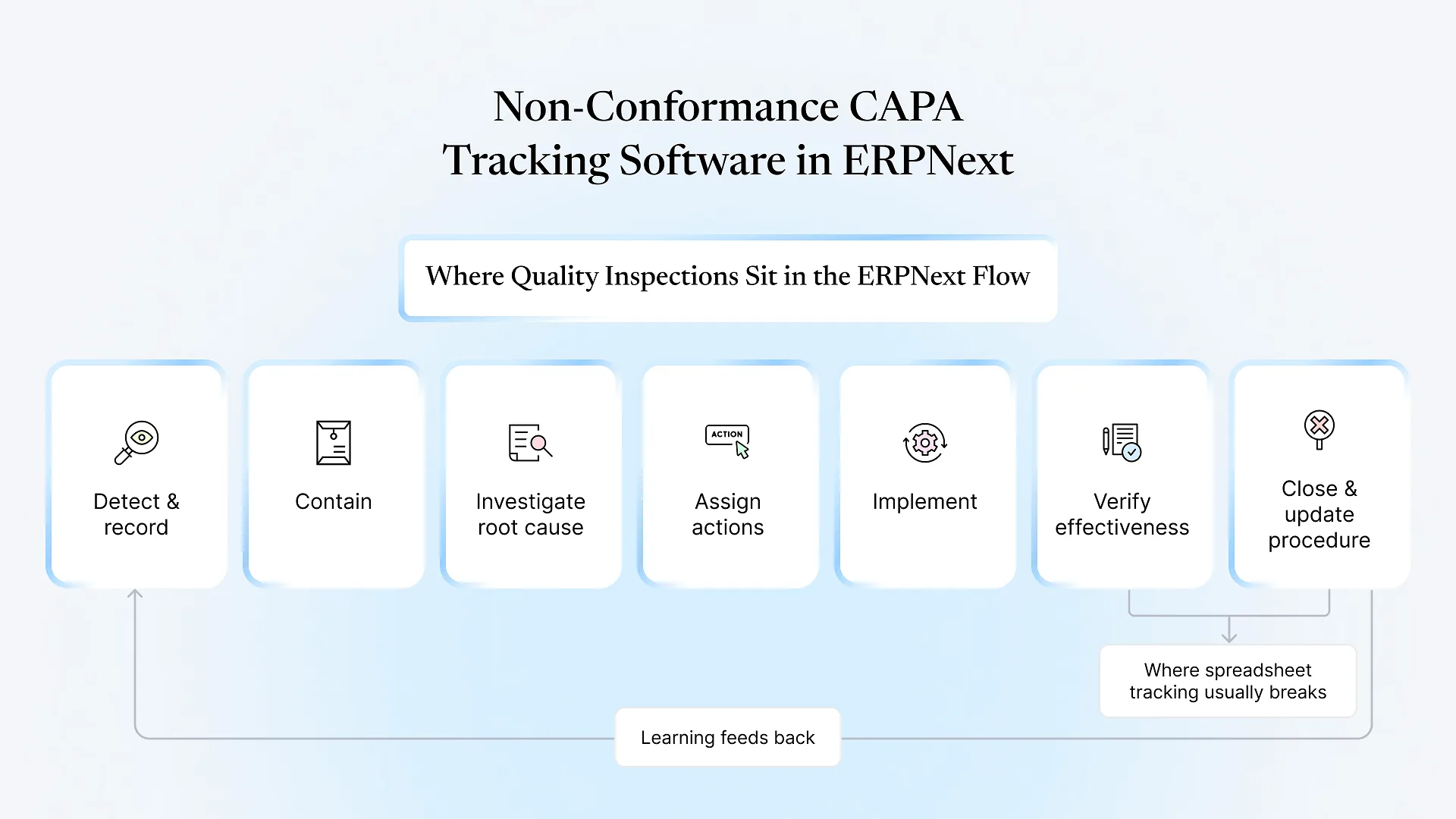
For follow-up, the Quality module includes Non Conformance, Quality Action and Quality Review documents. Use them to log the issue, assign corrective action and review effectiveness later.
When your rules go beyond pass/fail, you’ll typically need ERPNext customization rather than configuration alone. Examples include partial acceptance with a deviation approval, a QA hold that needs a named approver, or supplier ratings that update from inspection results.
Common mistakes when rolling out inspection workflows
Setting everything to "Warn"
Users learn to click past warnings within days. If a stage matters, set it to stop.
Oversized templates
A template with dozens of parameters gets filled in carelessly. Keep each one short and specific to the stage.
Inspecting everything
Over-inspection slows receiving and production, and entries start getting back-dated. Gate the high-risk points.
No rejected warehouse
Without one, failed stock ends up in the same bin as good stock.
Configuring before agreeing on the process
ERPNext enforces whatever you set up. If QA, stores and production haven't agreed who inspects what, the system will only enforce the confusion. A tailored ERPNext implementation starts with that agreement, not with the settings screen.
Already running ERPNext? What to check first
Which items actually have inspection flags ticked, compared with the QA plan
Whether Stock Settings are on stop or warn
Whether a Rejected Warehouse exists and is used
How many inspections are created after the transaction they're meant to control