



A multi location ERP implementation is the process of rolling out one connected ERP system, such as ERPNext, across two or more business locations, so branches share a common data structure, workflows, and reporting instead of running on disconnected spreadsheets or local processes. The hard part isn’t the software feature list — it’s two decisions most guides skip: how to structure the locations inside the system, and in what order to bring them live.
Get either one wrong and you don’t find out until branch two or three is already running on it, at which point restructuring means touching live transactional data instead of a clean setup.
Why This Is a Different Project Than a Single-Site Rollout
A single-location ERPNext implementation is mostly a configuration and training exercise: map your processes to the system, migrate your data once, train one set of users, go live. A multi-location rollout adds a structural layer underneath all of that — decisions about what’s shared centrally versus what varies by branch, and decisions about sequencing that a single-site project never has to make.
Those structural decisions are also harder to reverse once branches are live and transacting. That’s the real reason multi-location projects run into more rework than single-site ones — not because the software is harder to use, but because the planning questions are different and often get skipped in favor of jumping straight to configuration.
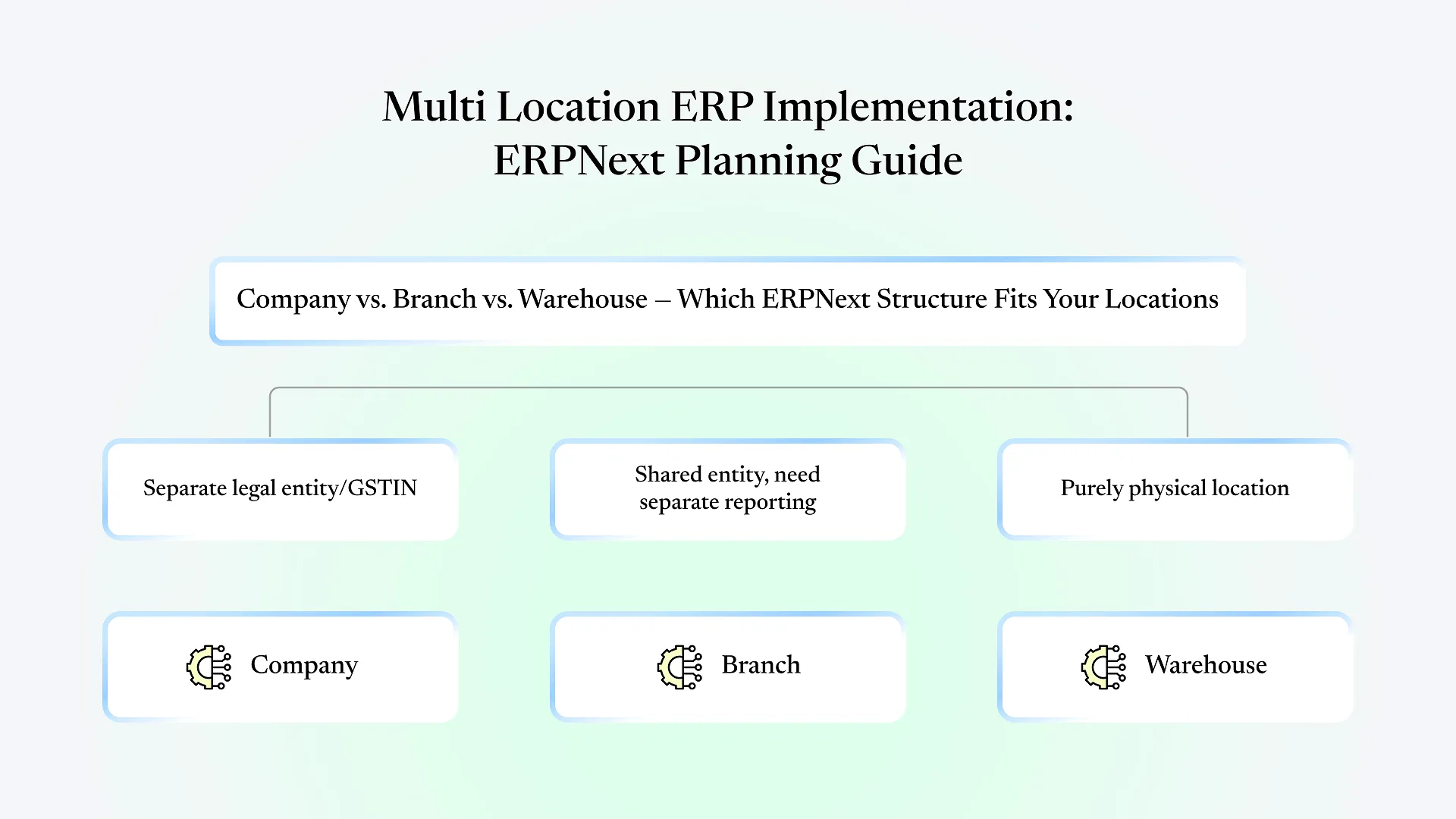
Company, Branch, or Warehouse — Choosing the Right ERPNext Structure First
| If your locations... | Use this ERPNext structure | Because |
|---|---|---|
| Are separate legal entities with their own GST registration or filing | Separate Companies | Each Company gets its own chart of accounts, ledgers, and statutory reports |
| Share one legal entity and one GSTIN, but need separate P&L visibility or cost centers | Branch (or cost center) within one Company | Keeps consolidated accounting intact while still splitting reporting |
| Are purely physical — a second warehouse, a second shop floor — with no separate reporting need | Multiple Warehouses under one Company | Simplest structure; stock and fulfillment split without duplicating accounting setup |
Sequencing a Multi Location ERP Implementation: Pilot Branch vs. Big-Bang
all branches on the same cutover date — works when branches run near-identical processes and the business can tolerate a short window of disruption across every location simultaneously. It's faster to reach full adoption but concentrates risk: if the configuration has a gap, every branch hits it on day one.
one representative branch first, then a phased expansion — costs more calendar time but lets you catch configuration gaps, missing approval workflows, or reporting mismatches on one location's data instead of all of them. For businesses where branches don't run identical processes (different product mix, different local compliance needs, different team sizes), a pilot also tells you which parts of the configuration are genuinely shared and which need branch-specific handling — something that's much harder to work out in the abstract before any branch is live. We've covered this same logic from the manufacturing side in our guide to going live without disruption — the underlying principle, reducing the blast radius of your first cutover, applies just as directly to a multi-branch rollout as it does to a single manufacturing site.
What to Standardize Centrally vs. Leave Flexible at the Branch Level
A multi-location rollout usually goes wrong at one of two extremes: standardizing everything (branches lose the flexibility they actually need) or standardizing nothing (you end up with N different configurations that don’t roll up into anything usable at the head-office level).
A workable starting point:
Standardize centrally
chart of accounts structure, item and UOM masters, approval hierarchies for anything that touches consolidated reporting, and the core sales/purchase/stock workflows.
Leave flexible at the branch
local warehouse layout, branch-specific print formats, local user roles matched to that branch's team size, and any workflow step that exists only because of a local operational reality (a branch that receives goods differently because of its physical layout, for instance).
If you’re running production across more than one site rather than just sales or distribution branches, the coordination problem gets sharper — production schedules, raw material transfers between plants, and consolidated output reporting all need to reconcile across locations in a way that pure sales branches don’t have to deal with. We’ve written separately about coordinating production across multiple plants in ERPNext if that’s closer to your situation than a distribution or retail branch network.
Where Multi-Location ERPNext Rollouts Typically Go Wrong
Deciding structure after configuration has already started
Once item masters, accounts, and a few transactions exist under the wrong Company/Branch structure, correcting it means touching live data, not adjusting a setting.
Assuming every branch's process is identical because the org chart says so
It rarely is — a branch that's been running its own workaround for two years has usually built that workaround for a reason worth understanding before you standardize it away.
Training once, centrally, and assuming it covers every branch
Branch teams need role-based training against their own data, not a generic walkthrough that happened at head office.
No clear owner for cross-branch data conflicts
When two branches enter the same customer or item differently, someone needs to own reconciling it — deciding that after go-live, under pressure, is worse than deciding it during planning.
If any of these sound like where your rollout is currently headed, it’s usually cheaper to fix the plan now than the data later — a fixed-scope quote from a rollout that’s already scoped around your branch structure tends to catch this earlier than a generic implementation timeline would.
A Planning Checklist for Your Multi-Location ERPNext Rollout
Confirm legal and financial structure of each location — separate GSTIN, shared entity, or purely physical — before touching configuration.
Choose Company, Branch, or Warehouse structure in ERPNext based on that confirmed structure, not on setup-wizard defaults.
Decide big-bang or pilot-branch sequencing based on how uniform your branch processes actually are.
Document what's standardized centrally (accounts, masters, approvals) versus branch-flexible (local layout, print formats, local roles) before configuration begins.
Assign an owner for cross-branch data conflicts before go-live, not after the first one occurs.
Plan role-based, branch-specific training rather than one central walkthrough.
Frequently Asked Questions
Only if they're separate legal entities with their own GST registration. If they share one entity, Branch-level cost centers usually give you the reporting split you need without duplicating your accounting setup.
There's no fixed multiplier — it depends on how many branches, how similar their processes are, and whether you pilot one branch first or go live everywhere at once. A pilot approach front-loads more planning time but reduces the risk of a longer cleanup afterward.
Generally yes, since there's more structural planning and more training across locations, but the cost difference is driven more by your branch count and process variation than by the software itself.
Yes — data migration can happen branch by branch, which is one of the practical advantages of a phased rollout over a big-bang cutover, since each branch's data gets validated on its own timeline instead of all at once.