



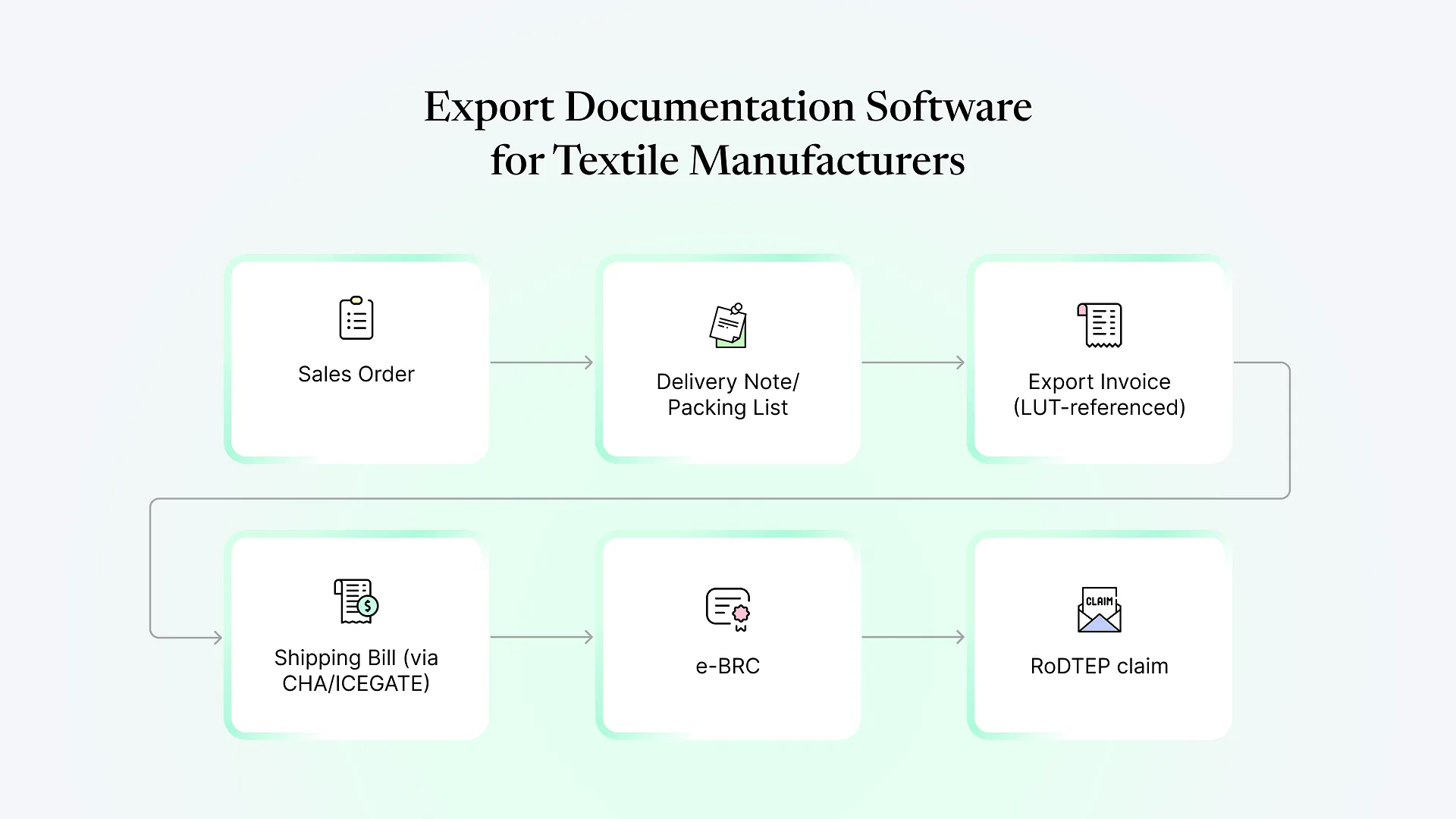
Export documentation software for textile manufacturers is a system — usually part of an ERP — that generates, tracks, and stores the invoices, packing lists, certificates of origin, and compliance filings required to ship goods internationally, pulling the data directly from sales orders and inventory records instead of retyping it into separate templates each time.
For a textile or apparel exporter, that paperwork chain is longer and more compliance-heavy than it looks from the outside. Getting it wrong doesn’t just cost time — it delays shipments, holds up GST refunds, and puts buyer relationships at risk.
What export documentation actually involves for textile exporters
buyer-specific formats, often with HS codes, Incoterms, and packing detail down to carton and roll level for fabric or garment shipments.
preferential (for trade agreements like APTA or GSP) or non-preferential, usually issued through a Chamber of Commerce or the relevant Export Promotion Council.
filed through ICEGATE by the customs house agent (CHA), referencing the invoice and packing list.
the annual filing that lets a registered exporter ship without paying IGST upfront, which needs to stay valid and gets referenced on every export invoice.
issued once payment is realized, and required to close out the export and claim benefits.
the duty remission claim filed against the shipping bill, calculated as a percentage tied to the product category.
Where manual export documentation breaks down
Most textile manufacturing units start out running exports the same way they run domestic sales — spreadsheets, Word templates, and a shared drive folder per buyer. That works until order volume or buyer count grows past a handful, and then a few patterns show up consistently:
Invoice and packing list data gets retyped between the ERP or accounting system and the export document templates, which is where HS codes, quantities, and values quietly drift apart. LUT numbers go out of date on invoices because renewal is an annual manual step nobody owns. BRC reconciliation lags because nobody is tracking which invoices are still waiting on payment realization. And buyer-specific documentation requests — a particular test certificate format, a specific packing declaration — get handled ad hoc each time instead of being set up once as a template.
None of this is a knowledge problem. Export teams at textile units usually know the compliance requirements well. It’s a systems problem, and it’s exactly what export paperwork automation is meant to solve — letting data flow between documents instead of being copied by hand.
How ERPNext Works as Export Documentation Software for Textile Exporters
Item and sales setup — HS code, unit of measure, and Incoterms can be captured once at the item or sales order level and carried through to every downstream document, instead of being re-entered per shipment.
Multi-currency export invoicing — sales invoices can be raised in the buyer's currency with the LUT reference and export invoice type set correctly, so the GST treatment is consistent without someone checking it manually each time.
Print formats for the document set — packing list, commercial invoice, and COO-supporting documents can be built as print formats that pull straight from the Sales Order → Delivery Note → Sales Invoice chain, so the same data underlies every document instead of being retyped into each one.
Tracking against payment realization and RoDTEP — custom fields or a linked doctype can track which invoices are awaiting e-BRC and which shipping bills still need a RoDTEP claim filed, turning a follow-up list that usually lives in someone's head into a queryable report.
This is where a lot of textile units find generic, off-the-shelf textile export ERP tools underwhelming — they handle the invoice and inventory side well but treat the LUT/BRC/RoDTEP follow-through as an afterthought, because it’s genuinely specific to how Indian export compliance works and not something a generic international ERP template anticipates.
If you’re evaluating this as part of a broader ERPNext rollout rather than a standalone tool, it’s worth looking at how the rest of the production and inventory workflow feeds into it — we’ve walked through that end-to-end in an ERPNext implementation for a textile manufacturer’s supply chain, where export documentation was one piece of a larger production-to-dispatch setup.
Even with the right system in place, a shipment can still stall waiting on a signature from a CHA or an Export Promotion Council — that’s a fair moment to get a second opinion on whether your current setup is actually built for how your exports work, rather than adapted from a domestic template.
What a practical export documentation workflow looks like in ERPNext
| Stage | What happens | What's automated |
|---|---|---|
| Sales Order | Buyer terms, Incoterms, HS code, currency captured | Data entered once, reused downstream |
| Delivery Note | Packing list generated against actual dispatch quantities | Pulled from Sales Order + stock entry |
| Export Sales Invoice | LUT reference, export type, currency conversion applied | Auto-populated from order and item master |
| COO supporting documents | Print format prepared for submission to issuing body | Generated from invoice/packing data; submission itself is manual |
| Shipping bill | Filed via CHA through ICEGATE | Manual — outside ERP, though invoice data should match exactly |
| e-BRC tracking | Payment realization logged against the invoice | Tracked as a follow-up record, not automatically fetched from the bank |
| RoDTEP claim | Claim prepared against the shipping bill | Tracked and calculated; filing is a separate compliance step |
Where this still needs manual work
It’s worth being direct about the limits here, because overselling this is exactly what makes a lot of export-ERP marketing hard to trust. ERPNext does not file shipping bills with ICEGATE, does not issue a Certificate of Origin, and does not automatically pull bank realization data. Those all involve an external authority — customs, a CHA, a Chamber of Commerce, or a bank — and stay manual steps, connected to ERPNext through reference numbers and reports rather than a direct integration.
What changes is where the manual effort goes. Instead of manually keeping five documents consistent with each other, the manual work narrows down to the actual external filing steps — the parts that were always going to require a human and an external authority anyway.
Frequently Asked Questions
ERPNext can generate the print format and supporting data (invoice value, HS code, buyer details) that a Certificate of Origin application needs, but the certificate itself is still issued by a Chamber of Commerce or Export Promotion Council — that submission and issuance step stays outside the ERP.
Yes — export invoices can be configured with the correct GST treatment (zero-rated under LUT, or with IGST payment) and the LUT reference carried on each invoice, so the tax treatment doesn't have to be checked manually per shipment.
Export invoices need multi-currency support, an Incoterm and HS code on record, and the correct GST/LUT treatment — domestic invoices don't carry most of this. Setting up the item master and sales order fields correctly up front is what makes the export invoice generate cleanly rather than needing manual correction.
Not directly out of the box — shipping bill filing goes through a CHA. What ERPNext can do is keep the underlying invoice and shipment data clean and consistent, so whatever the CHA files matches your records exactly, and track shipping bill numbers and RoDTEP claims once filed.
The documentation chain — LUT, invoice, packing list, BRC, RoDTEP — applies regardless of size. Smaller exporters often feel the manual-reconciliation pain more acutely per order, since there's no dedicated documentation team to catch mismatches before they become a problem at the port.
If your export documentation is currently living across spreadsheets, email threads, and one person’s memory of which LUT number is current, book a free ERPNext consultation and we’ll walk through what a workflow built around your actual export process — not a generic template — would look like.