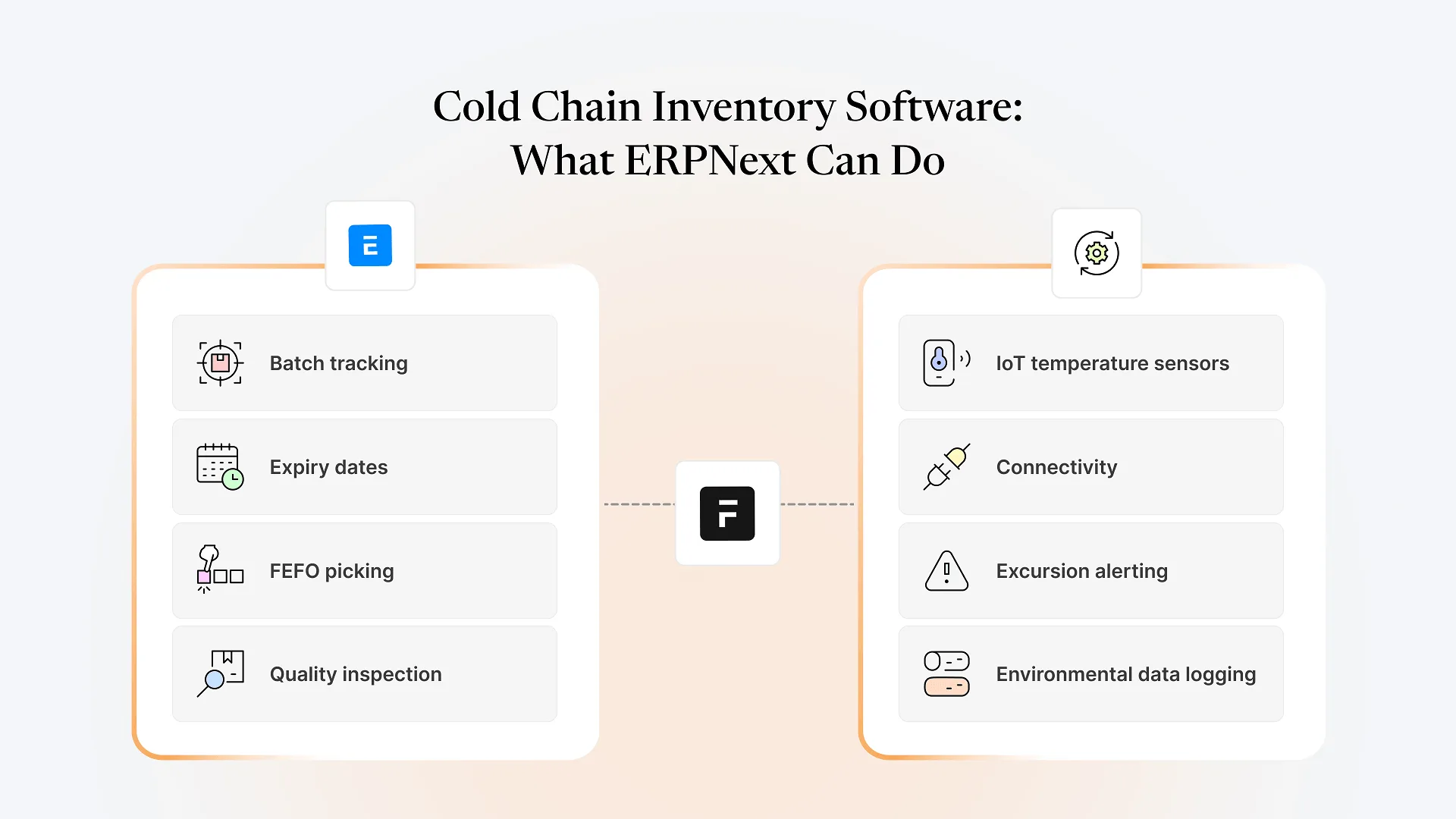
Can ERPNext work as cold chain inventory software for temperature-sensitive FMCG stock? ERPNext natively tracks batches, expiry dates, and FEFO-based stock movement out of the box, but it has no built-in temperature or humidity sensors. Real-time cold chain monitoring requires integrating IoT hardware through Frappe’s open API layer.
That’s the honest, two-part answer, and most vendor pages on this topic blur the line between the two. Below is what ERPNext actually does natively for temperature-sensitive FMCG stock, where it stops, and what it takes to close that gap without ripping out your existing system.
What Cold Chain Inventory Software Needs to Do for FMCG Stock
For frozen, chilled, or otherwise temperature-sensitive FMCG inventory, “cold chain inventory software” typically needs to do two distinct jobs. The first is inventory logic: tracking which batch a unit belongs to, when it expires, and enforcing that older or near-expiry stock moves out before newer stock (FEFO — first-expired, first-out). The second is environmental monitoring: knowing the actual temperature and humidity a batch was held at, continuously, from receiving through dispatch, and raising an alert the moment a reading drifts outside a safe range.
These two jobs sound like one system to most buyers evaluating “cold chain software” as a category, but they sit on genuinely different layers of the stack. One is a data and workflow problem an ERP is built to solve. The other is a hardware and telemetry problem that depends on physical sensors, connectivity, and a monitoring layer sitting between the sensor and your records.
What ERPNext Handles Natively for Temperature-Sensitive Stock
ERPNext’s inventory module was built for batch and expiry-driven stock in general, and cold chain FMCG inventory fits squarely inside that. Out of the box, ERPNext lets you assign batch numbers and expiry dates to items, track stock levels by batch and warehouse, and configure FEFO-based picking so older or closer-to-expiry batches are prioritized during dispatch rather than left to whoever’s picking that day to remember. We’ve covered this batch-and-expiry mechanism in more detail elsewhere, since it’s the same underlying logic FMCG brands rely on for any perishable or shelf-life-bound stock, cold chain or not.
ERPNext also supports warehouse-level and zone-level stock segregation, so you can model a cold storage area as a distinct warehouse or sub-warehouse and report on it separately from ambient stock. Quality inspection workflows can be attached to stock receipt or delivery, so a batch can be held for inspection before it’s released into saleable inventory. None of this requires customization; it’s standard ERPNext inventory configuration.
Where ERPNext Stops: Temperature and Humidity Monitoring
What ERPNext doesn’t do is read a physical sensor. There’s no built-in mechanism for continuous temperature or humidity capture, no native alerting when a cold room drifts above a threshold, and no automatic logging of the environmental conditions a batch actually experienced in transit. That data has to come from somewhere else: a temperature logger, an IoT sensor network, or a cold storage facility’s own monitoring system.
This is the part vendor content on “cold chain ERP” tends to gloss over. An ERP can hold the record of what temperature range a batch was supposed to stay within, and it can flag a batch as non-compliant once told that it went outside that range. It can’t independently know whether that actually happened without a data feed from the physical layer.
Bridging the Gap: Integrating IoT Sensors With ERPNext
This is where Frappe’s architecture matters more than ERPNext’s inventory module alone. Frappe exposes a REST API and supports webhooks, which means a third-party IoT sensor platform, a cold storage monitoring system, or a logistics partner’s tracking device can push temperature readings directly into ERPNext against the relevant batch or warehouse. An excursion event from the sensor platform can trigger a status update on the batch record, a hold on dispatch, or a notification to the ops team, depending on how the integration is configured.
This isn’t a built-in feature you toggle on. It’s an integration project: choosing a sensor/monitoring vendor, defining what data needs to land in ERPNext and at what frequency, and building the connection between the two systems. The scope of that work varies a lot depending on how many cold storage points you have and how real-time the alerting needs to be.
At Aavatto, this is the kind of integration work we do regularly alongside ERPNext implementation — connecting external systems into a business’s core inventory records rather than treating ERPNext as a closed box.
When You Actually Need a Dedicated Cold Chain System vs.ERPNext Alone
Not every FMCG brand handling temperature-sensitive stock needs a dedicated cold chain platform bolted onto ERPNext. If your main risk is enforcing FEFO and catching expired or soon-to-expire stock before it ships, that’s native ERPNext territory, and adding a separate system would be redundant. If regulatory reporting requires a documented, continuous temperature log for every batch, or if a distribution partner requires proof of unbroken cold chain for insurance or compliance reasons, that’s a genuine case for IoT sensor integration, because ERPNext has no way to generate that data on its own.
The scale of your cold storage footprint matters too. A single cold room at one facility is a much smaller integration than a network of cold storage points across multiple warehouses feeding data back to one ERPNext instance in real time. Before deciding whether to invest in sensor integration, it’s worth mapping which of these two problems you actually have, since they call for different scopes of work.
Frequently Asked Questions
If you’re trying to work out whether your cold chain gap is an ERPNext configuration question or an integration project, talk to us about your FMCG operations and we can help you map it out.