ERPNext WhatsApp integration connects ERPNext to Meta’s WhatsApp Business Cloud API — either through native Notification and WhatsApp Message doctypes or a marketplace app — so events like a confirmed order, an overdue payment, or a dispatched shipment trigger a WhatsApp message automatically, without anyone on your team sending it by hand.
SMS integration works the same way in principle but through a different, older mechanism (the SMS Settings doctype), and the two aren’t interchangeable choices — they suit different situations, which is the part most guides on this topic skip past.
What "WhatsApp and SMS integration" actually means in ERPNext
Two separate things get lumped under this phrase, and mixing them up is where most setup confusion starts.
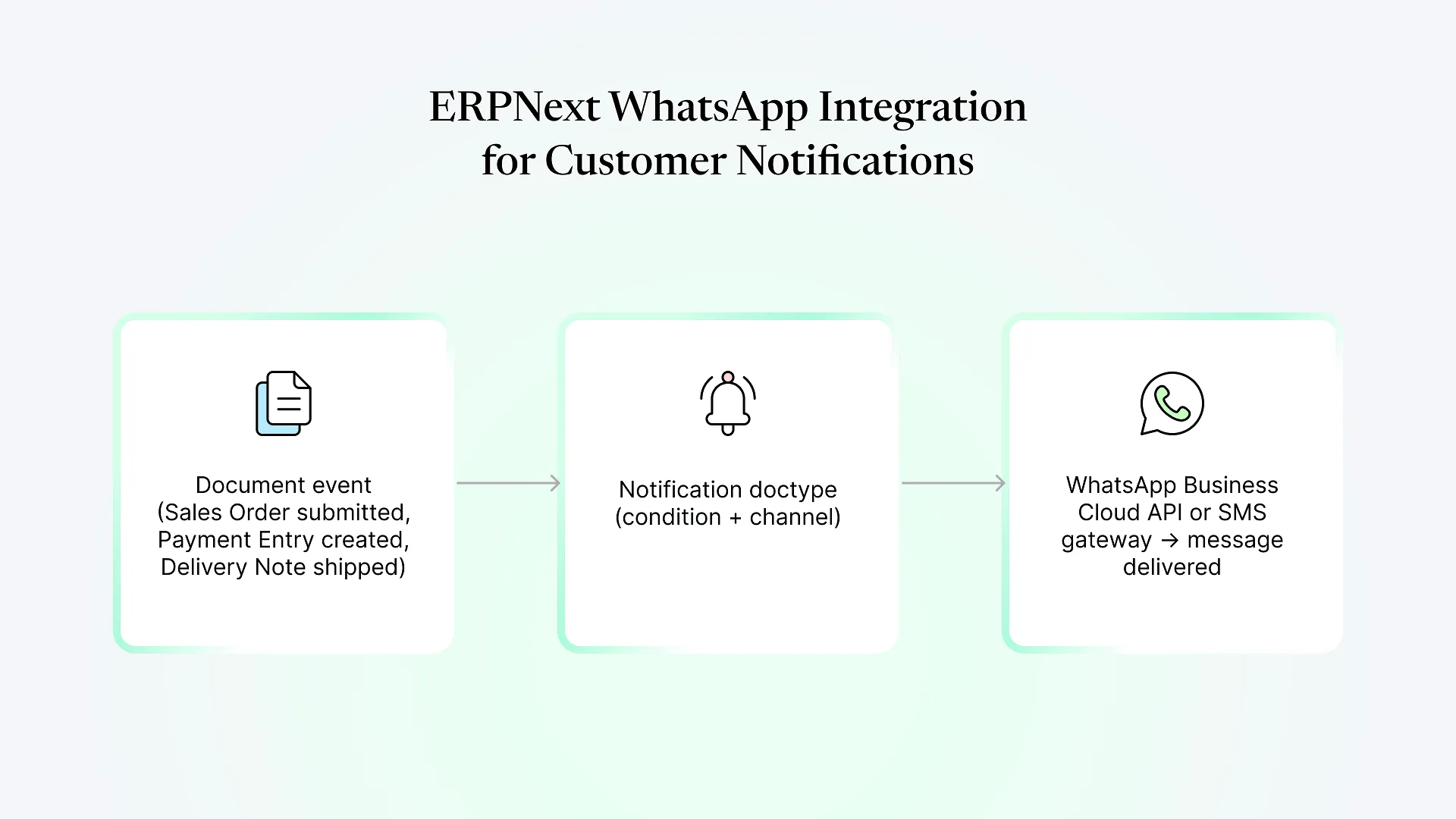
WhatsApp messaging in ERPNext runs through Notification records — the same automation doctype used for email alerts — configured to fire on a document event (a Sales Order submitted, a Payment Entry created, a Delivery Note marked as shipped) and send via a WhatsApp channel instead of, or alongside, email. Behind that channel sits Meta’s WhatsApp Business Cloud API, which means before any of this works, you need a verified Meta Business account, a registered WhatsApp Business phone number, and API credentials connected to ERPNext.
SMS runs through the older, simpler SMS Settings doctype, where you plug in a gateway provider’s API URL and credentials (Twilio, MSG91, and most regional SMS aggregators are common choices), and ERPNext posts to that gateway the same way it would call any external API.
How ERPNext WhatsApp integration actually works
The mechanism is straightforward once it’s connected: a Notification rule watches for a document event, checks its condition (for example, only fire when a Sales Order’s status changes to “Confirmed”), and sends a WhatsApp message using a template you’ve defined inside ERPNext.
The part that catches most teams off guard isn’t the ERPNext configuration — it’s Meta’s own rules for the WhatsApp Business Platform. Any message your business initiates (not replying to a customer who messaged first) has to use a pre-approved template, and Meta’s review of new templates can take anywhere from a few hours to a few days. Free-form, un-templated messages are only allowed within a 24-hour window after a customer messages you first — useful for support conversations, not for a scheduled dispatch notice sent three days later. Plan your template list and get it into Meta’s review queue before you plan your go-live date, not after.
For businesses that want richer, two-way conversations — a customer replying to check order status, a simple chatbot flow, agents responding from a shared inbox — the native Notification setup isn’t really built for that; that’s where a dedicated WhatsApp Business app or a custom build against the Cloud API earns its cost. For pushing out one-way transactional updates, native is usually the right starting point.
If you’re already comparing this against other ways ERPNext connects to outside systems, it sits inside the same ERPNext integrations landscape as payment gateways and marketplace connectors — some paths are native configuration, others need custom API work, and the deciding factors are similar.
Setting up ERPNext SMS notifications as a fallback channel
SMS doesn’t carry the template-approval overhead WhatsApp does, which is exactly why it’s still worth keeping configured even after WhatsApp is live: it reaches a phone with no smartphone, no app, and no data connection required, and it fails less mysteriously when it fails at all.
The tradeoff is cost and richness. SMS is billed per message with no free tier comparable to WhatsApp’s service-window messages, carries no read receipts or media, and — for businesses sending to Indian phone numbers — requires DLT (Distributed Ledger Technology) registration with the telecom regulator for both your sender ID and your message templates before a gateway will deliver anything. That registration process is a real lead-time item, not a same-day setup, and it’s worth starting in parallel with your WhatsApp template approvals rather than after.
WhatsApp vs. SMS: which one for which message
| Factor | SMS | |
|---|---|---|
| Setup dependency | Meta Business verification + template approval | Gateway account + (India) DLT registration |
| Best for | Order confirmations, dispatch updates, rich formatting, links | Time-critical or low-connectivity alerts, OTPs |
| Cost pattern | Per-conversation category pricing, varies by country | Per-message, no free service window |
| Reliability without smartphone/data | No | Yes |
| Read confirmation | Yes (delivery/read status) | No |
Most businesses running both end up using WhatsApp as the primary channel for anything customer-facing and richer, with SMS as the fallback for OTPs, urgent alerts, or customers who haven’t opted into WhatsApp messages at all.
If your team is still deciding whether this is worth building now or later, that’s usually a five-minute conversation once we know what’s triggering the notifications you actually need — talk to us about your integration and we’ll tell you honestly whether it’s a native configuration job or a custom build.
Common notification triggers worth automating first
Sales Order confirmation, sent the moment a quotation converts
Payment received acknowledgment, tied to Payment Entry submission
Delivery/dispatch notice, tied to Delivery Note or shipment status
Overdue payment reminder, on a scheduled check against Sales Invoice due dates
Internal alerts — low stock, approval pending — sent to staff rather than customers